An infographic is a single graphic that explains data or an idea with charts, icons, and short text, so a reader gets the point in seconds. The best ones share three traits: a headline that states the finding, one main visual, and a named source. Below are 32 real infographic examples from 12 publishers across government, science, healthcare, finance, and manufacturing.
Short on time? Start with the Census Bureau's Gig Picture, NASA's Inside the SLS Core Stage, and Mondi's 2025 performance at a glance.
How we picked them: every example is a public, live page or file from a named publisher, checked October 31, 2026, with no login or form.
How it's organized: a summary table, then 14 types from statistical (8 examples) to sustainability (2), then the patterns across all 32 and a review checklist.
Last updated: October 31, 2026. Curated by the Pineable editorial team.
- Lead with the finding: the Census Bureau titles graphics with the question or the answer, never a topic label.
- Use one chart per question; 8 of the 32 examples are single statistical graphics built around one dataset.
- Name the source on the graphic itself, as all 14 Census Bureau examples do in a footer band.
- Choose the layout by the data: maps for location, split panels for then and now, numbered panels for steps.
- Publish a web image, not only a PDF, if you want the infographic seen and indexed.
What Makes a Good Infographic?
A good infographic answers one question and proves the answer with real data. Everything else on the page supports that job: the headline, the chart, the icons, and the source line.
Weak infographics do the opposite. They stack ten loosely related numbers, decorate them with stock icons, and leave out where the data came from. Readers can't tell what matters, and nobody can check the claims.
Our infographic design guide covers hierarchy, chart choice, and sizing in depth. This page is the gallery: real work you can study and borrow from.
Why Most of These Come From Public Institutions
Be aware of one bias before you scroll. Of the 32 examples, 14 come from the U.S. Census Bureau, 7 from NASA, and 1 from WHO. That's 22 from public bodies and 10 from companies.
That mix is a result of our rules, not a preference. We only include infographics that are visible on a public page or file, with a clear publisher and date. Government agencies publish graphics that way by default, on stable pages with the source printed on the image. Many brand infographics sit behind lead forms or inside gated reports, so we dropped them. Two candidates, from Coresight and Equifax, failed because the infographic itself wasn't visible on the public page.
The brand examples that made it are strong, though: Arm, Mondi, Afterpay, Capgemini, CASCINATION, Accenture, Panasonic, TCN, and the American Hospital Association. If you design for a company, the Census and NASA layouts still transfer well, because the design decisions don't depend on who paid for them. Our curation criteria explain how we choose and credit work.
Summary Table
| # | Publisher | Type | Industry | Standout Element |
|---|---|---|---|---|
| 1 | U.S. Census Bureau | Statistical | Economy | Two charts, one scene |
| 2 | U.S. Census Bureau | Statistical | Manufacturing | Question headline |
| 3 | U.S. Census Bureau | Statistical | Tax policy | Bar chart plus map |
| 4 | U.S. Census Bureau | Statistical | Arts and entertainment | Three headline numbers |
| 5 | U.S. Census Bureau | Statistical | Economy | Arrows show direction |
| 6 | U.S. Census Bureau | Statistical | Economy | One number on a map |
| 7 | U.S. Census Bureau | Statistical | Healthcare | Honest caveat |
| 8 | American Hospital Association | Statistical | Healthcare | Definition first |
| 9 | TCN | Survey results | Customer service software | Ungated survey page |
| 10 | Afterpay | Survey results | Fintech | Brand voice headline |
| 11 | Capgemini | Survey results | Consulting and retail | Long scroll format |
| 12 | U.S. Census Bureau | Map | Economy | One color scale |
| 13 | U.S. Census Bureau | List | Demographics | Three ranked columns |
| 14 | U.S. Census Bureau | List | Seasonal | Seasonal hook |
| 15 | U.S. Census Bureau | Comparison | Food and beverage | Then and now split |
| 16 | U.S. Census Bureau | Comparison | Trade | Containers as bars |
| 17 | U.S. Census Bureau | Report summary | Real estate | Bold lead figures |
| 18 | U.S. Census Bureau | Report summary | Real estate | Stats then charts |
| 19 | NASA | Process | Space science | Four panel cycle |
| 20 | NASA | Process | Space science | Numbered sequence |
| 21 | NASA | Process | Aerospace | Five numbered steps |
| 22 | WHO South-East Asia | Informational | Public health | Plain language points |
| 23 | NASA | Anatomy | Aerospace | Numbered cutaway |
| 24 | NASA | Anatomy | Aerospace | Labels on both sides |
| 25 | NASA | Timeline | Space science | Missions on an arc |
| 26 | NASA | Diagram | Space science | Location carries data |
| 27 | Arm | Financial results | Semiconductors | Quote beside numbers |
| 28 | Panasonic | Financial results | Consumer electronics | Results plus forecast |
| 29 | Accenture | Financial results | Professional services | Quarterly series |
| 30 | CASCINATION | Year in review | Medical devices | Milestone scroll |
| 31 | Mondi | Sustainability | Packaging and paper | Three pillars, three metrics |
| 32 | Mondi | Sustainability | Packaging and paper | Map plus bar charts |
Statistical Infographics
Statistical infographics put one dataset front and center. They work when the reader's question is "how much" or "how many."
1. U.S. Census Bureau: Gig Picture of Nonemployer Statistics
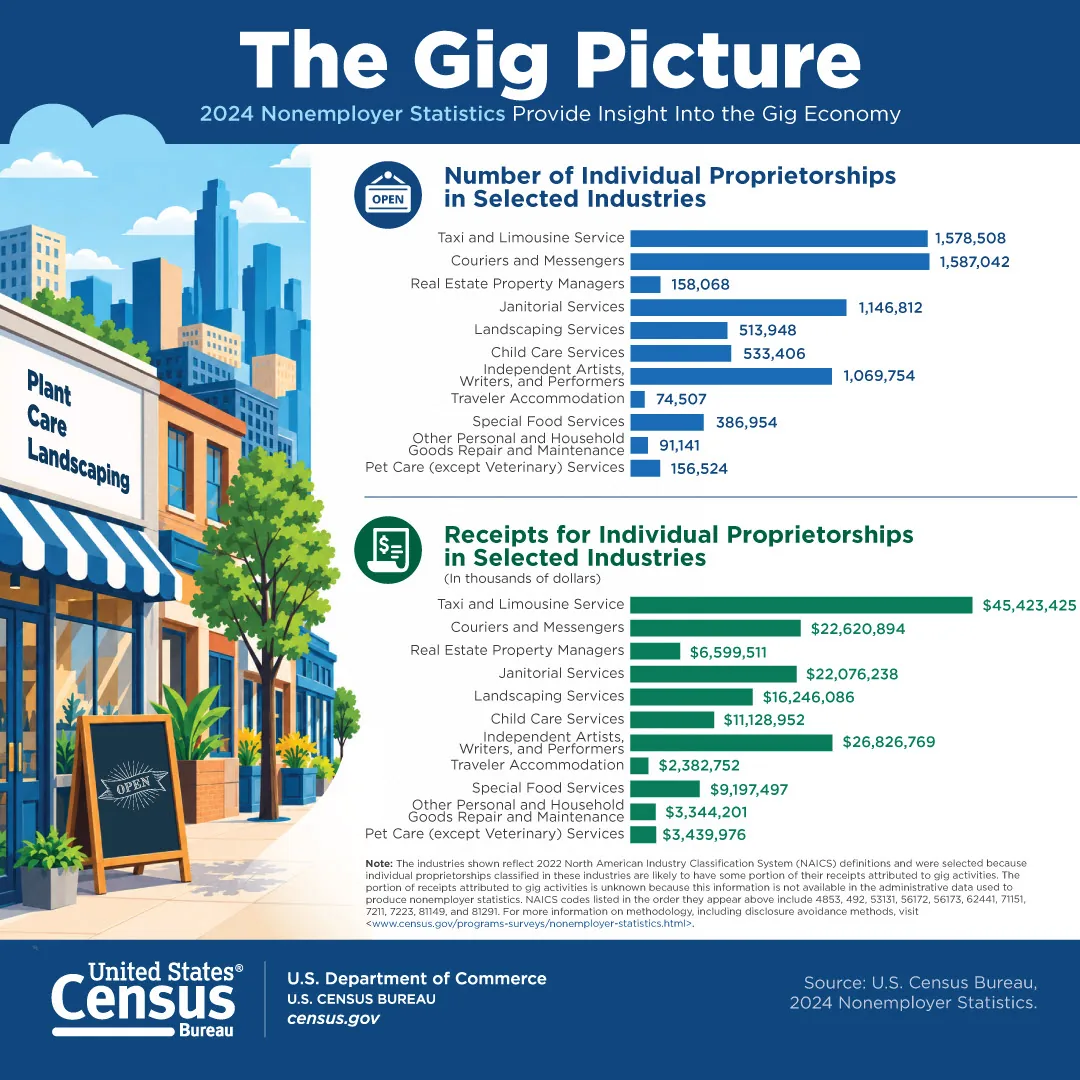
Credit: The Gig Picture: 2024 Nonemployer Statistics, U.S. Census Bureau. Shown for commentary and curation.
The Gig Picture stacks two bar charts, one in blue for the number of sole proprietorships and one in green for their receipts, across the same eleven industries. An illustrated street of small shops on the left gives the numbers a setting. Color and icons separate the two charts, so you never confuse count with revenue.
Steal this: When you show two measures for the same categories, repeat the category order and give each measure its own color.
2. U.S. Census Bureau: Employees in Each Manufacturing Subsector
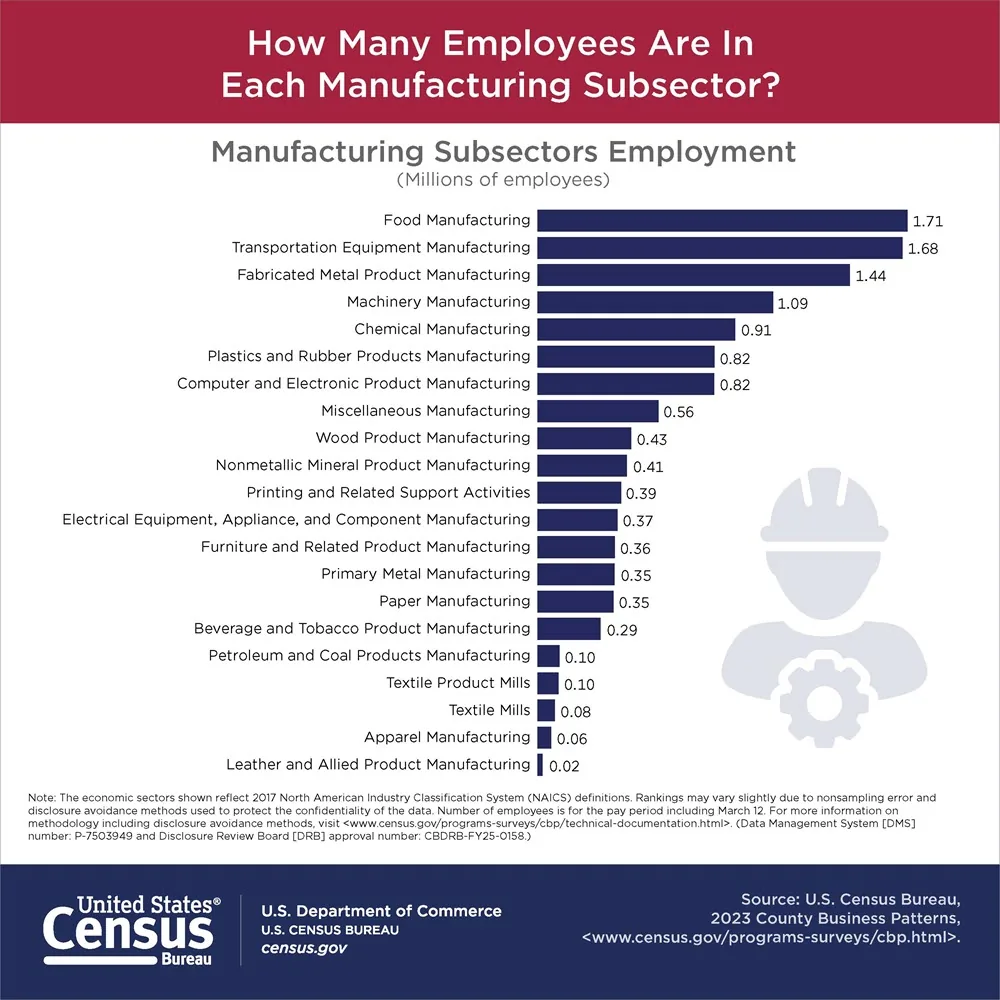
Credit: How Many Employees Are in Each Manufacturing Subsector?, U.S. Census Bureau. Shown for commentary and curation.
The headline of this Census graphic is the question, and one bar chart sorted from largest to smallest answers it. Food manufacturing tops the list and leather sits at the bottom. A pale worker icon fills the empty space without competing with the bars.
Steal this: Sort bars by value, not alphabetically, so the ranking is the first thing readers see.
3. U.S. Census Bureau: State Cannabis Excise Tax Revenue per Capita
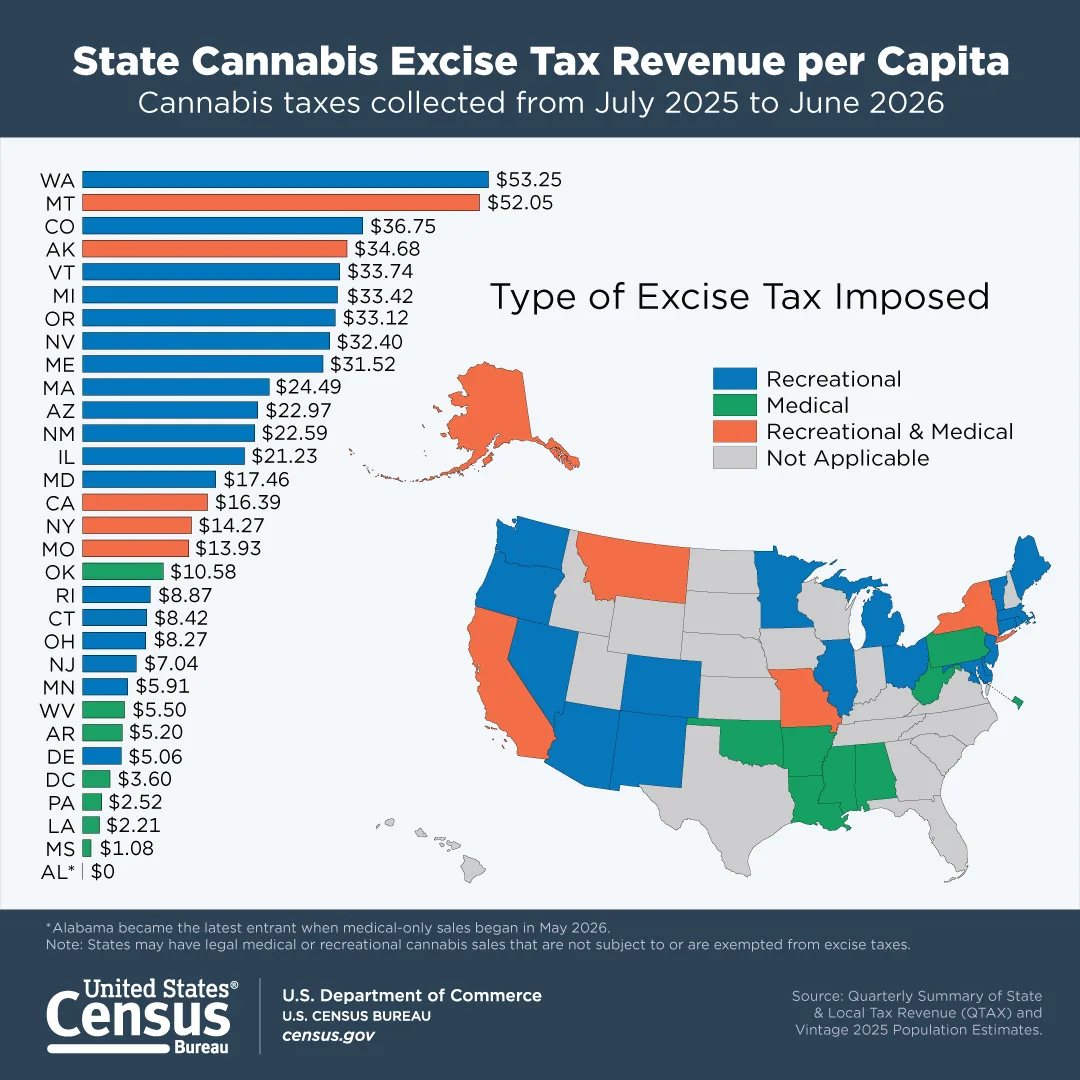
Credit: State Cannabis Excise Tax Revenue per Capita, U.S. Census Bureau. Shown for commentary and curation.
This graphic runs a ranked bar chart of states down the left and a U.S. map on the right. The bars and the map share one legend: recreational, medical, both, or not applicable. You get the ranking and the geography in a single view.
Steal this: If two charts share a variable, use one legend and the same colors in both.
4. U.S. Census Bureau: Consumption of Arts and Entertainment
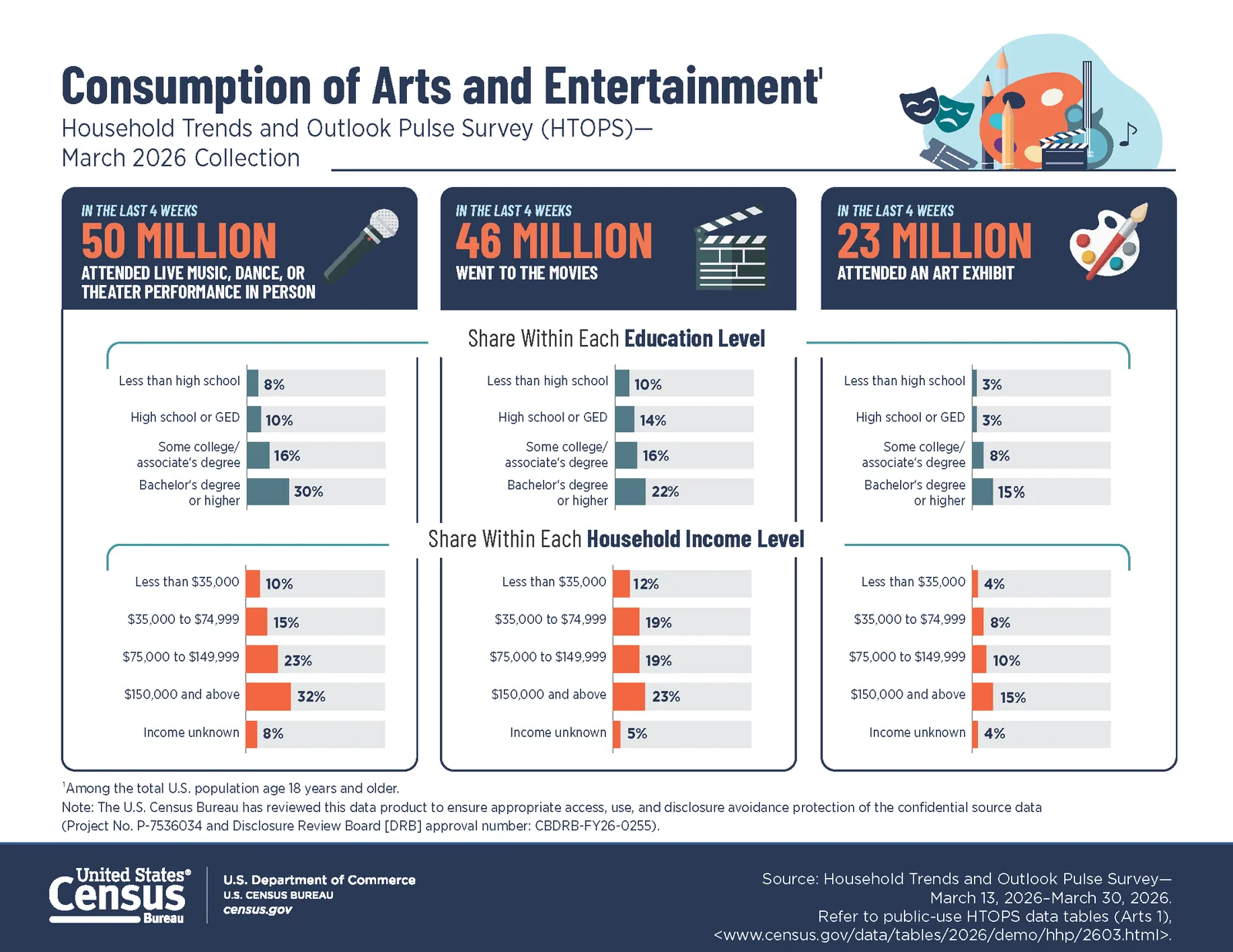
Credit: Consumption of Arts and Entertainment, U.S. Census Bureau. Shown for commentary and curation.
This survey graphic opens with three big numbers in dark panels: live performances, movies, and art exhibits. Under each, small bar charts break the number down by education level and by household income. The three columns line up, so you can compare across activities as well as down.
Steal this: Put the summary number on top and the breakdown below it, in the same column.
5. U.S. Census Bureau: Measuring Social and Economic Well-Being
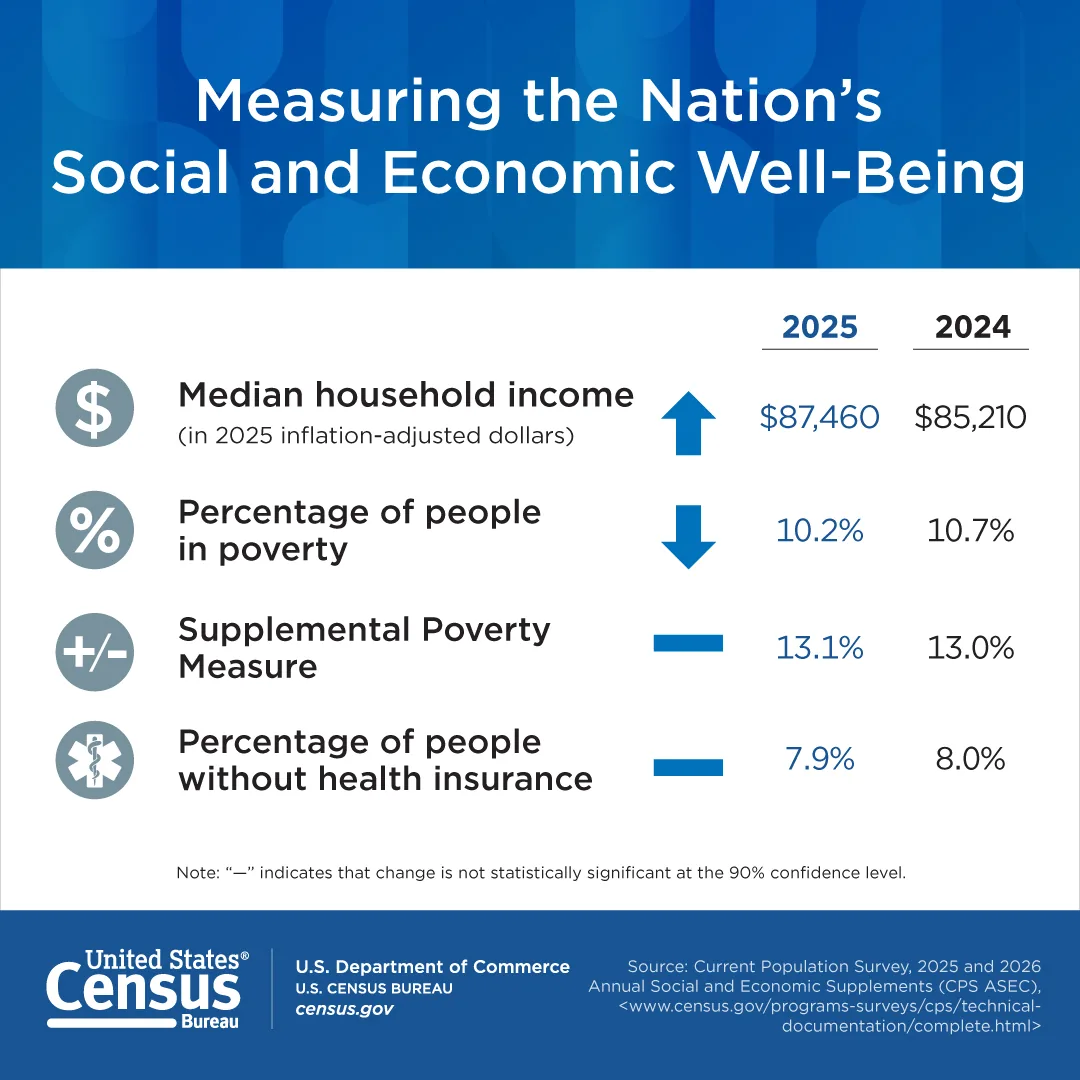
Credit: Measuring the Nation's Social and Economic Well-Being, U.S. Census Bureau. Shown for commentary and curation.
This graphic is a four row table with a twist: each row has an icon and an arrow. An up or down arrow marks a real change, and a flat bar marks a change that isn't statistically significant. The footnote explains the bar in one line.
Steal this: Show the direction of change with a symbol, so readers don't have to subtract.
6. U.S. Census Bureau: Median Household Income
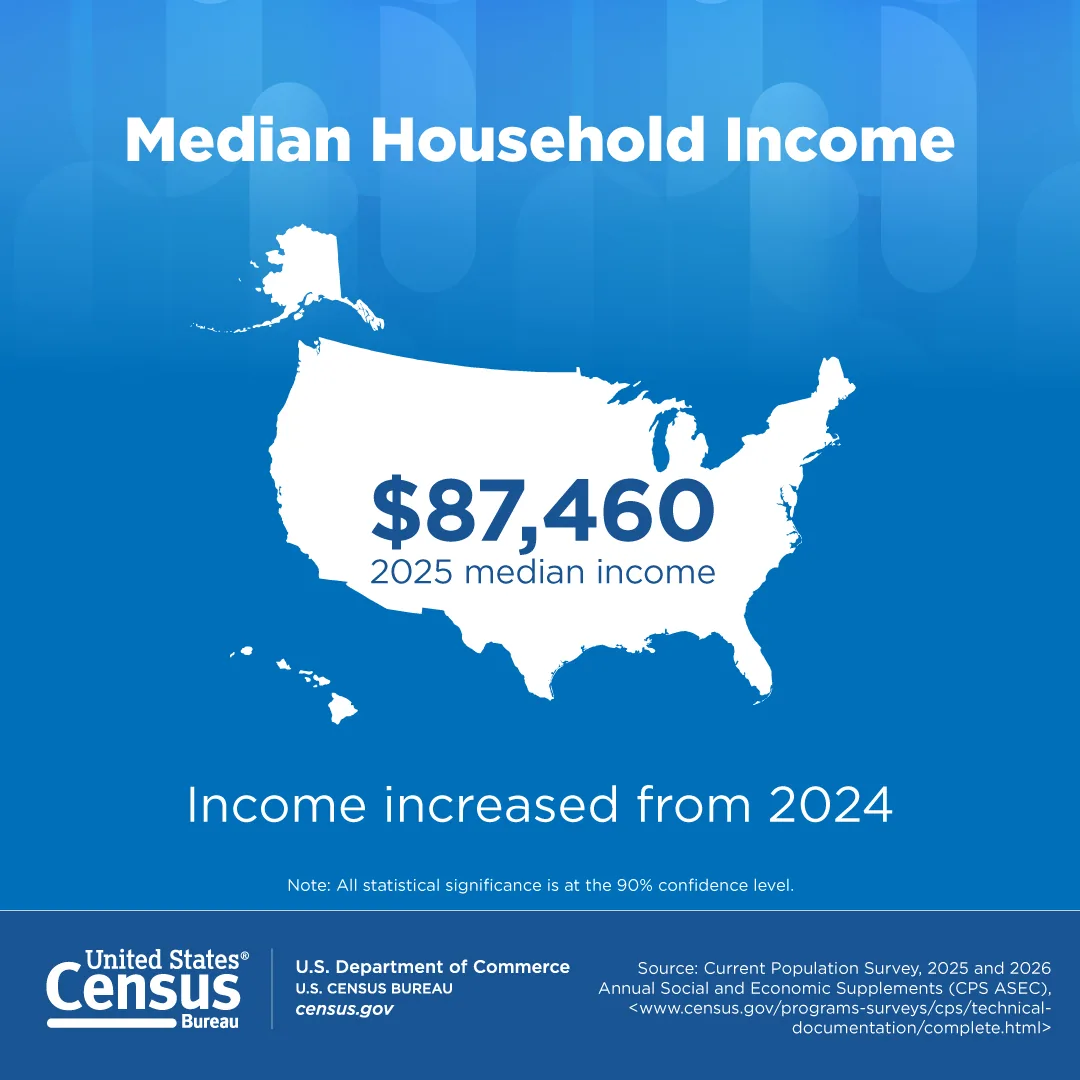
Credit: Median Household Income, U.S. Census Bureau. Shown for commentary and curation.
This square graphic carries one number on a white U.S. silhouette and one sentence below: income increased from 2024. It's built for a social feed, where one fact is all a scroller will read. It shares a template with example 7, which makes the series feel like one family.
Steal this: For social, cut the graphic to one number and one sentence, then reuse the template.
7. U.S. Census Bureau: Health Insurance Coverage
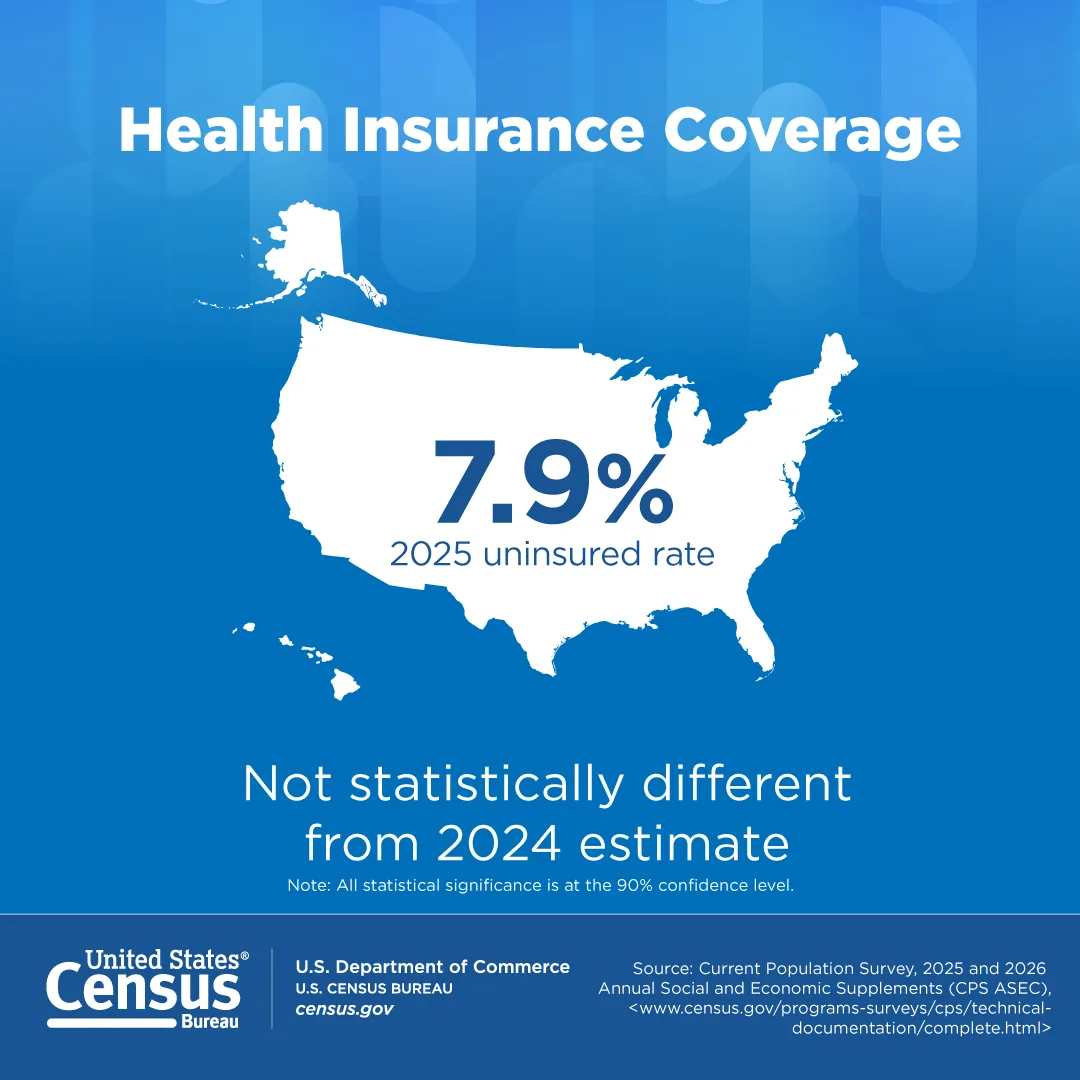
Credit: Health Insurance Coverage, U.S. Census Bureau. Shown for commentary and curation.
This companion graphic uses the same layout, but the takeaway line says the rate was not statistically different from the 2024 estimate. That's an honest headline most brands would never print. It keeps the agency credible when the news is "no change."
Steal this: If the change isn't meaningful, say so on the graphic instead of implying a trend.
8. American Hospital Association: Fast Facts on U.S. Health Systems
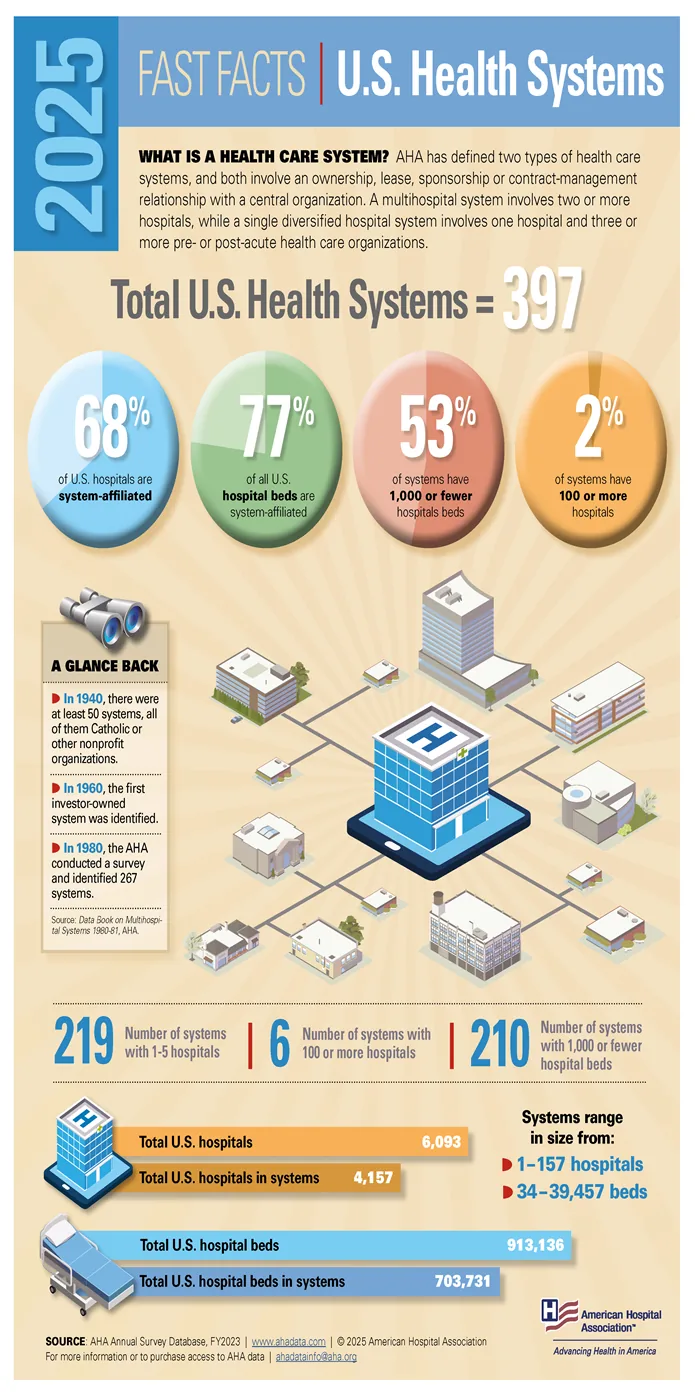
Credit: Fast Facts: U.S. Health Systems 2025, American Hospital Association. Shown for commentary and curation.
The AHA's Fast Facts opens with a definition of a health care system before it shows a single number. Then it gives the total, four colored percentage circles, and "A Glance Back" box with three dates. The source line at the bottom names the survey database and year.
Steal this: When your audience may not know the term, define it at the top of the graphic.
Survey Results Infographics
Survey infographics turn a questionnaire into a handful of findings. The good ones print the sample and the dates, so readers can judge the numbers.
9. TCN: 2025 Consumer Survey Results
Credit: 2025 Consumer Survey Results, TCN. Shown for commentary and curation.
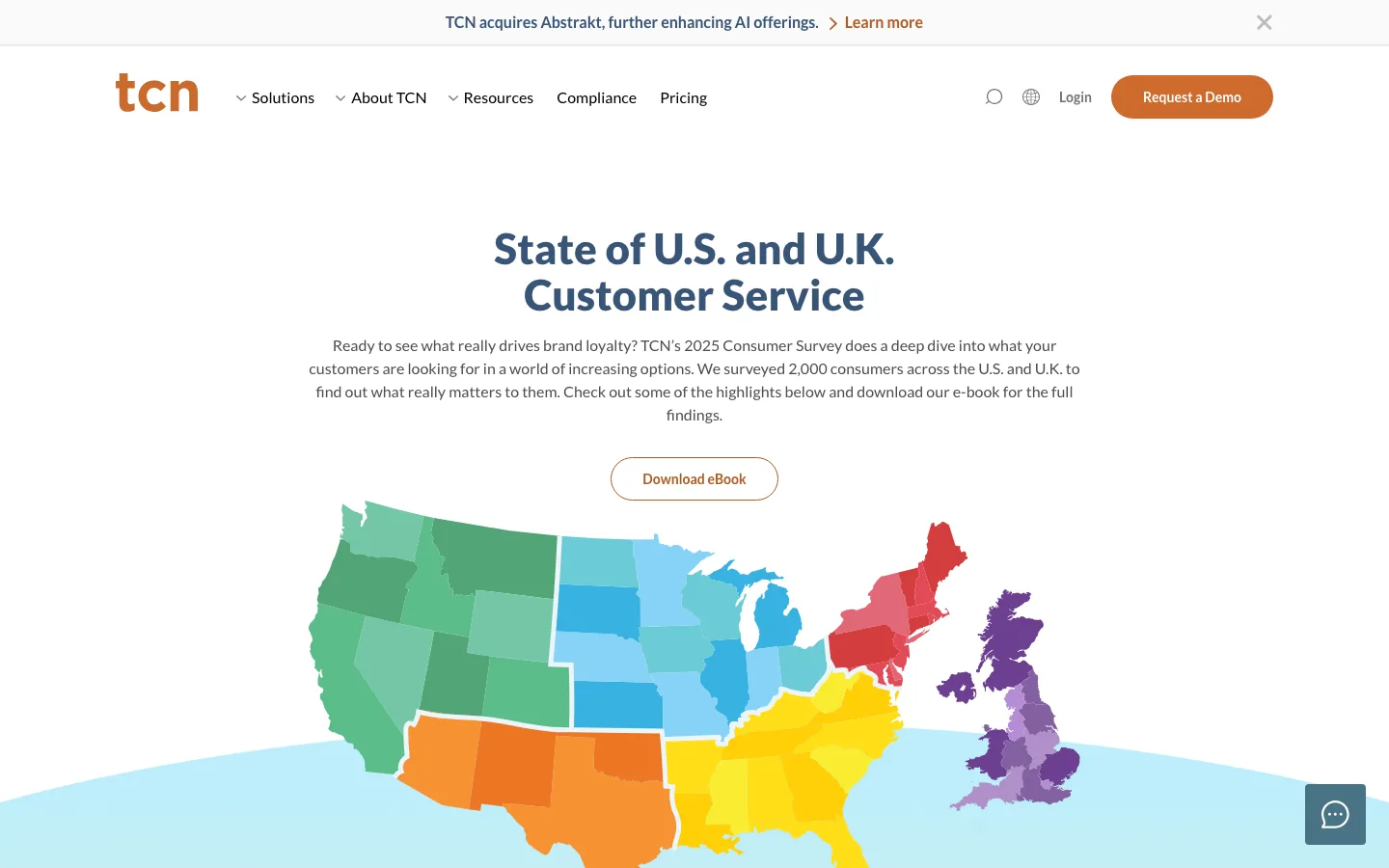
TCN, a contact center software company, publishes its 2025 consumer survey highlights as an open web page rather than a gated PDF. The intro states the sample in one sentence, and a map of the U.S. and U.K. signals the two markets before any chart appears. The full findings sit in a downloadable eBook below.
Steal this: Put the highlights on an open page and keep the full report as the download.
10. Afterpay: Why Credit Cards Give Gen Z the Ick
Credit: Why Credit Cards Give Gen Z the Ick, Afterpay. Shown for commentary and curation.
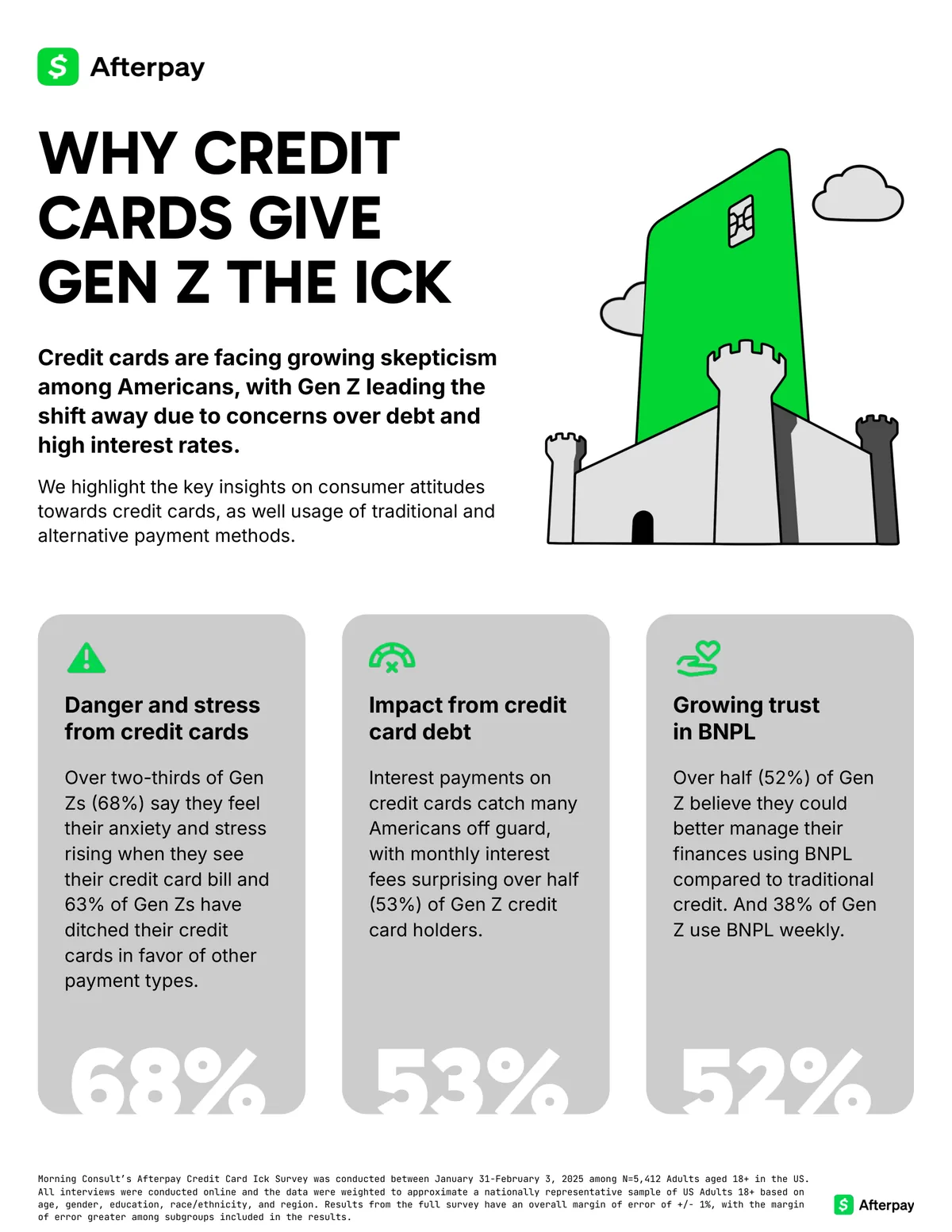
Afterpay's survey graphic uses a bold, all caps headline written in the audience's own slang. Three gray cards each carry one theme, a short paragraph, and a giant number at the bottom. The fine print names Morning Consult, the dates, and the sample size.
Steal this: Write the headline in your audience's voice, then back it with a methodology line.
11. Capgemini: What Matters to Today's Consumer

Credit: Consumer Trends 2025 infographic, Capgemini Research Institute. Shown for commentary and curation.
Capgemini's consumer trends infographic is a very long vertical file that reads like a scroll. It starts with five named consumer clusters, then moves through sections such as social commerce, each with a bold finding as its heading and a bar chart below. Every chart carries its own source note with the survey dates and sample.
Steal this: In a long infographic, make every section heading a complete finding.
Map Infographics
Use a map when the location is the story. If the reader's question is "where," a table can't compete.
12. U.S. Census Bureau: Poverty Rate by County
Credit: Poverty Rate by County: 2024, U.S. Census Bureau. Shown for commentary and curation.
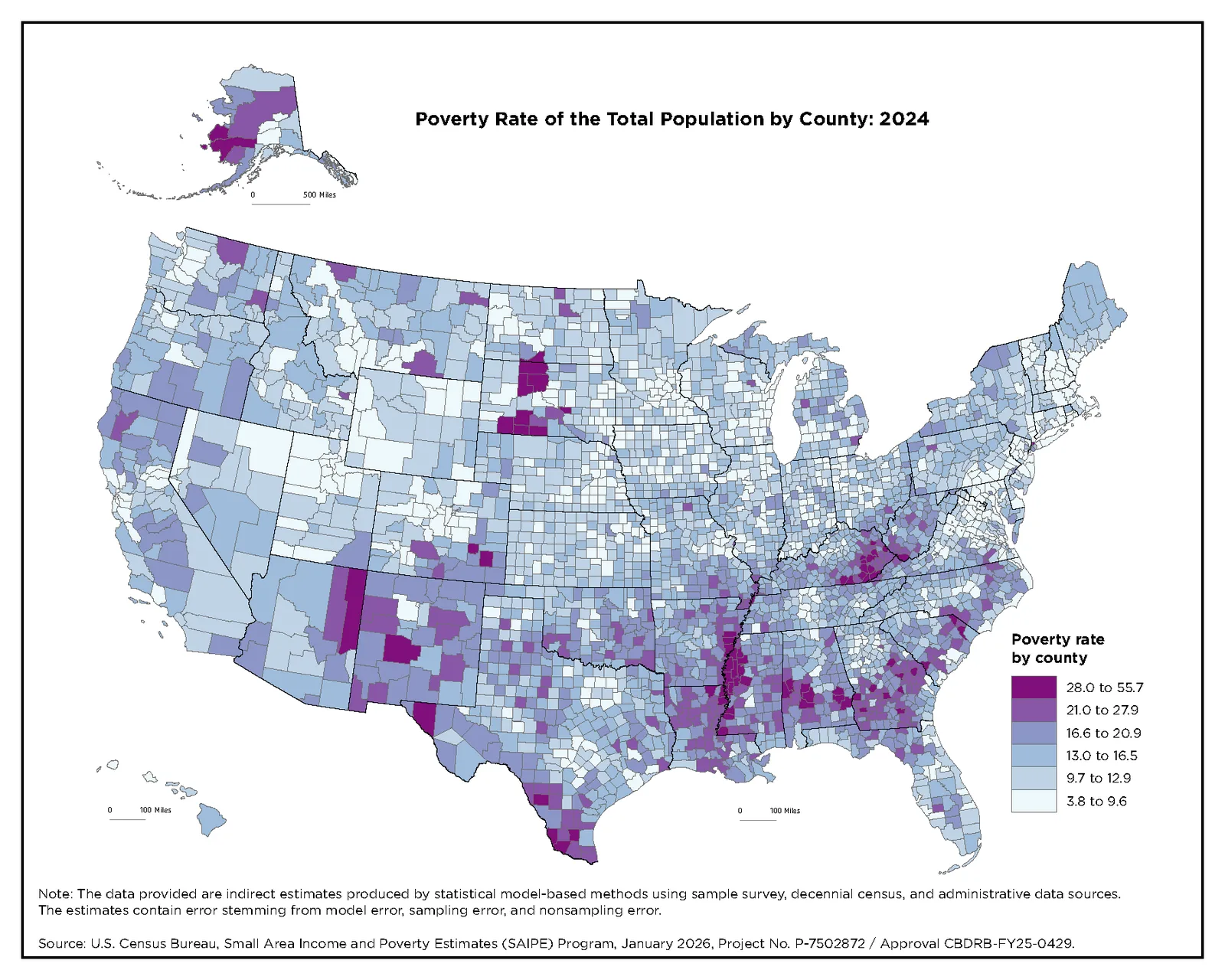
This county map uses one sequential color scale with six steps, from pale blue to deep purple. Clusters of high poverty jump out without a single label. The note at the bottom explains that the figures are model based estimates with error.
Steal this: Use one color ramp for one variable, and keep the legend small and close to the map.
List Infographics
List infographics rank or group items. They need a strong theme because the content itself is simple.
13. U.S. Census Bureau: Top 10 Names for Hispanic Heritage Month
Credit: Celebrating Hispanic Heritage Month, U.S. Census Bureau. Shown for commentary and curation.
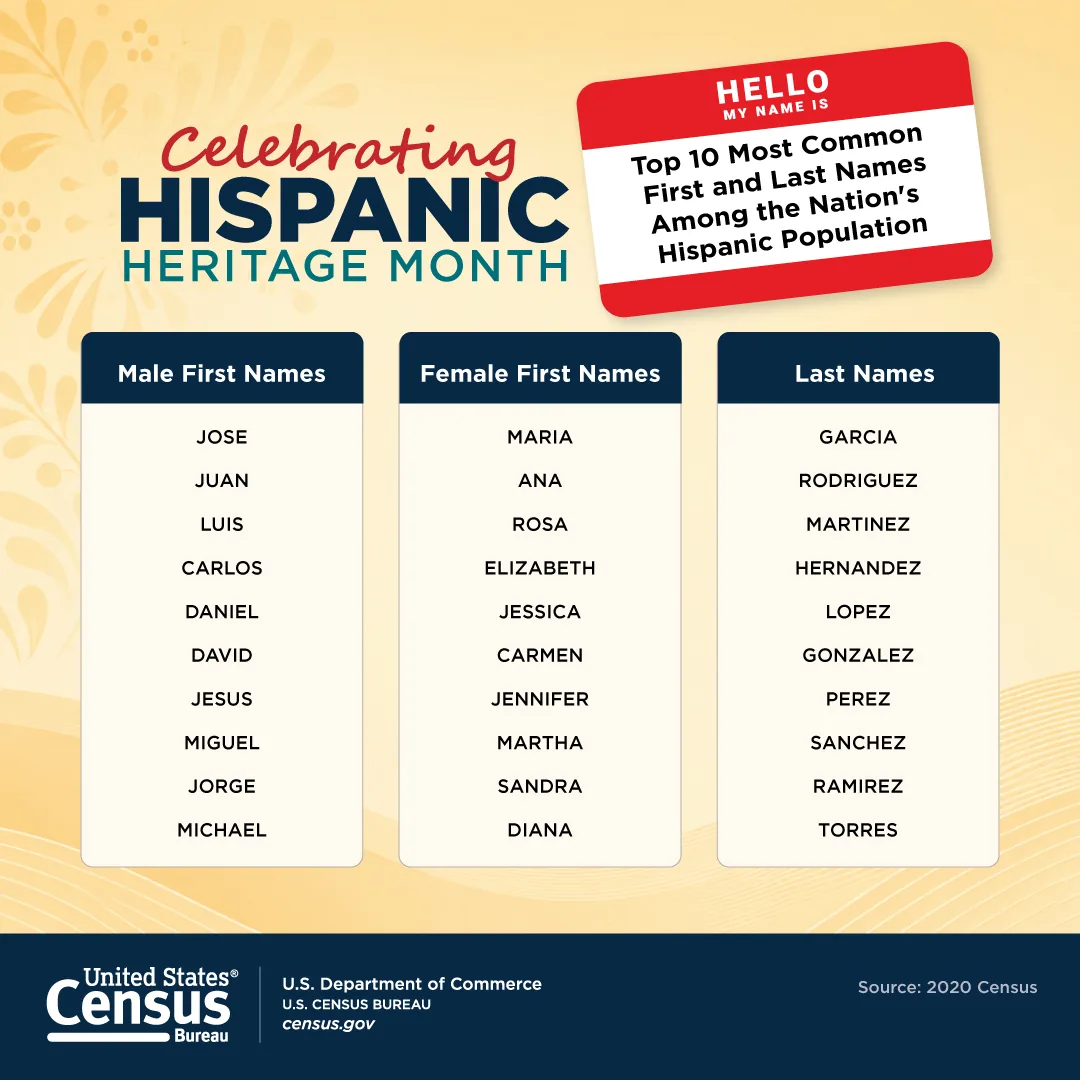
This list graphic shows three columns of ten names each under a "Hello, my name is" sticker. The sticker explains the content in one glance, and the warm palette fits the celebration. The source is the 2020 Census, printed in the footer.
Steal this: Use a familiar object, like a name tag, to explain what a list contains.
14. U.S. Census Bureau: Boo! Who Lives There?
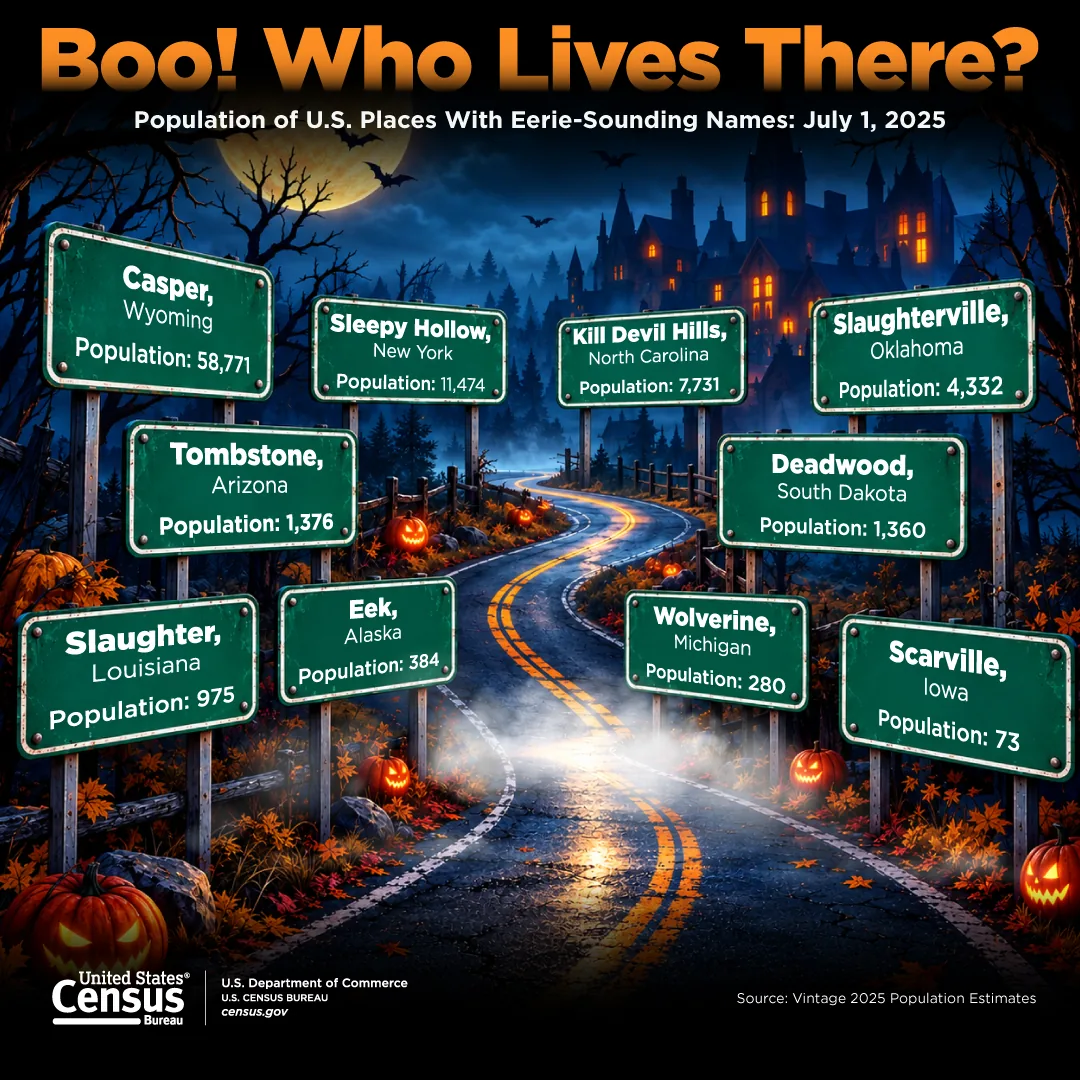
Credit: Boo! Who Lives There?, U.S. Census Bureau. Shown for commentary and curation.
This seasonal graphic lists ten places with eerie names, such as Tombstone, Arizona, and Scarville, Iowa, on green road signs. Each sign gives the place's population from the Vintage 2025 estimates. It's a list dressed as a scene, timed for Halloween.
Steal this: Tie real data to a calendar moment, and the graphic has a reason to be shared.
Comparison Infographics
Comparison infographics set two or more things side by side. The design job is making like compare with like.
15. U.S. Census Bureau: Alcohol Production Then and Now
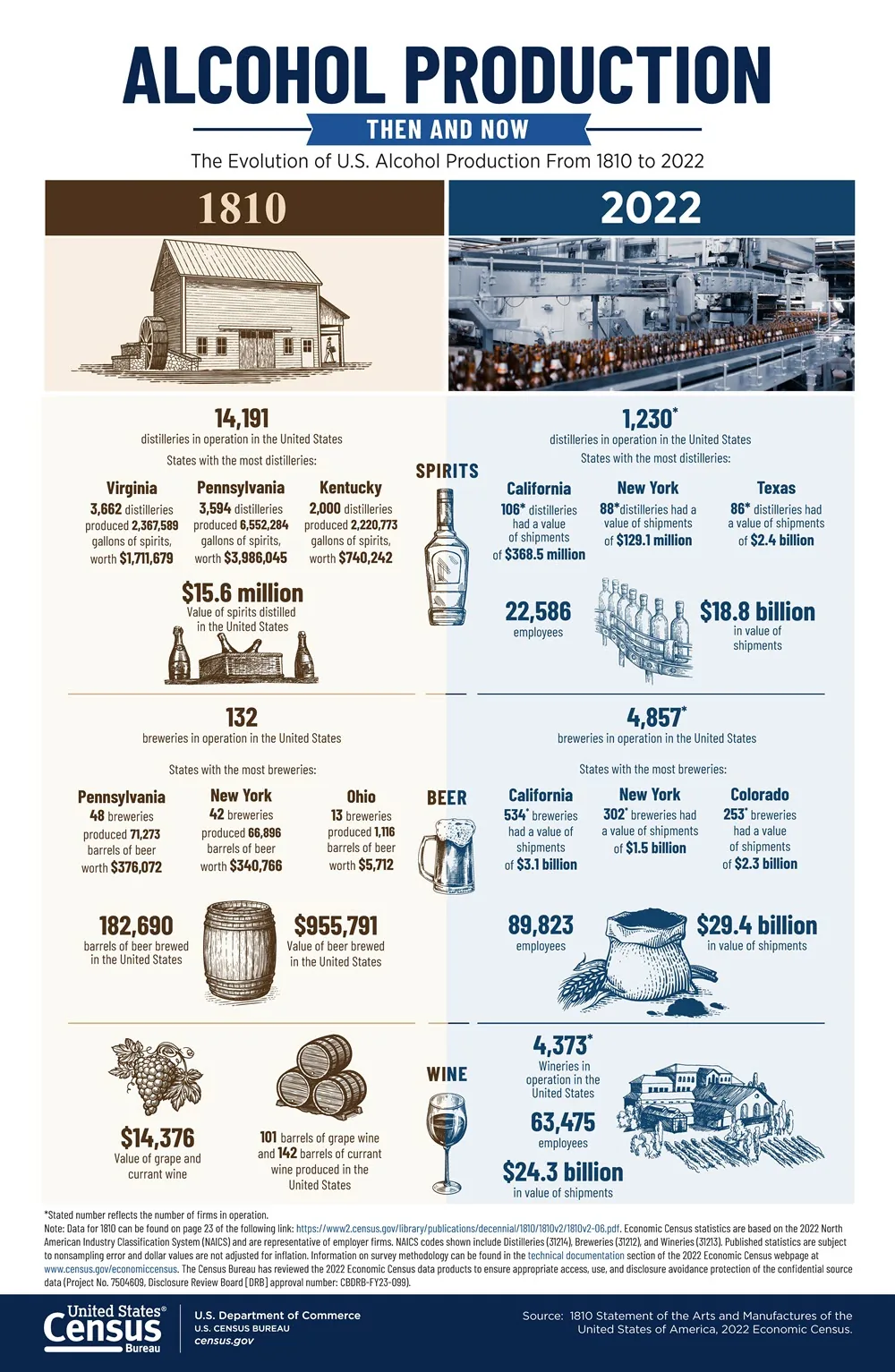
Credit: Alcohol Production: Then and Now, U.S. Census Bureau. Shown for commentary and curation.
This comparison splits the page into a brown 1810 column and a blue 2022 column. Rows for spirits, beer, and wine run across both, each with matching engravings, so the eye compares the same product across two centuries. The color split does the labeling.
Steal this: In a then and now graphic, give each era its own color and keep the rows identical.
16. U.S. Census Bureau: How Manufacturing Contributes to Exports
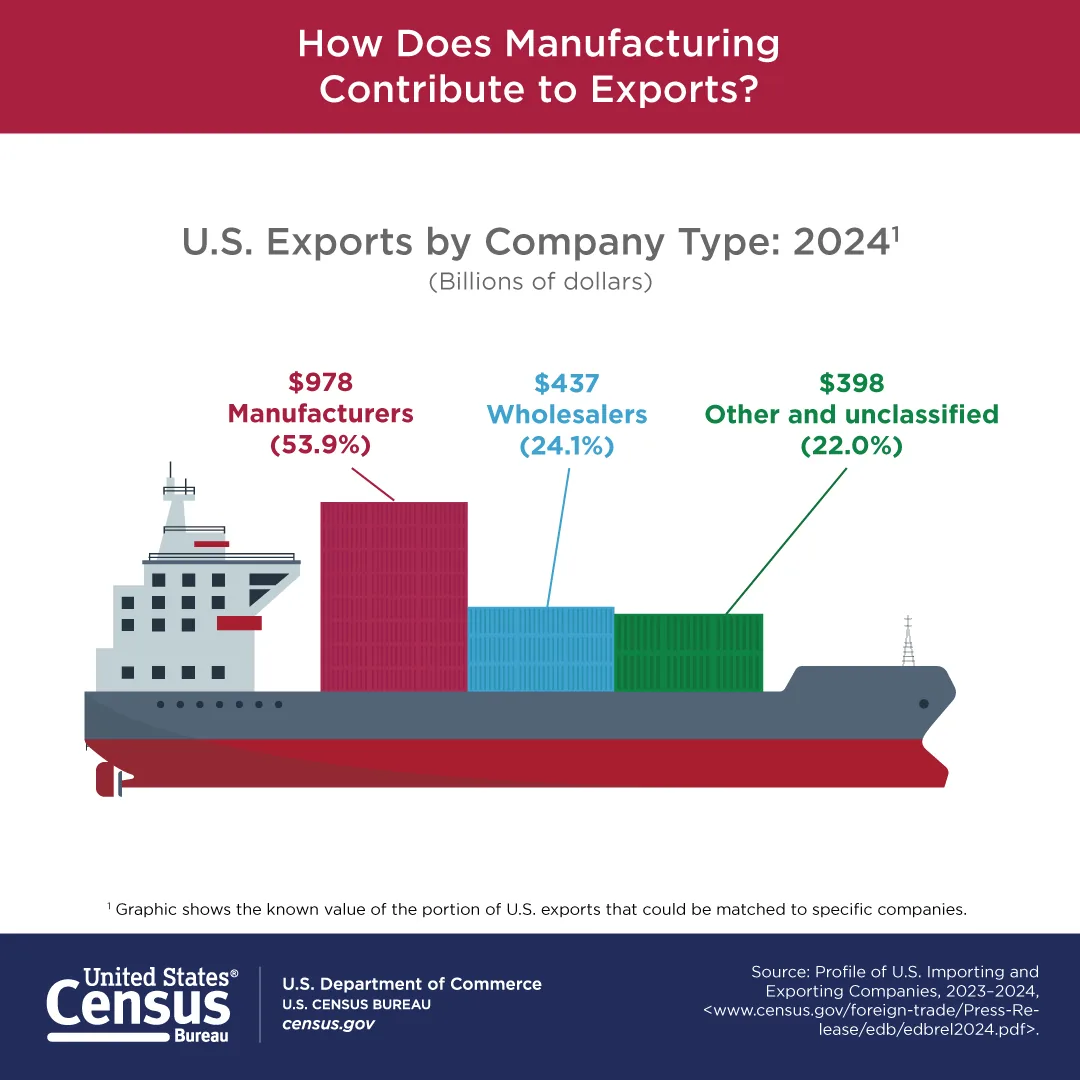
Credit: How Does Manufacturing Contribute to Exports?, U.S. Census Bureau. Shown for commentary and curation.
This export graphic turns a bar chart into three shipping containers on a cargo ship. Container height matches each value, and each label uses the container's color. A footnote clarifies that only exports matched to companies are shown.
Steal this: Swap bars for an object from the topic, but keep the sizes true to the data.
Report Summary Infographics
Report summaries squeeze a research brief onto one page. They're dense, so the hierarchy has to be strict.
17. U.S. Census Bureau: Homeownership 2025
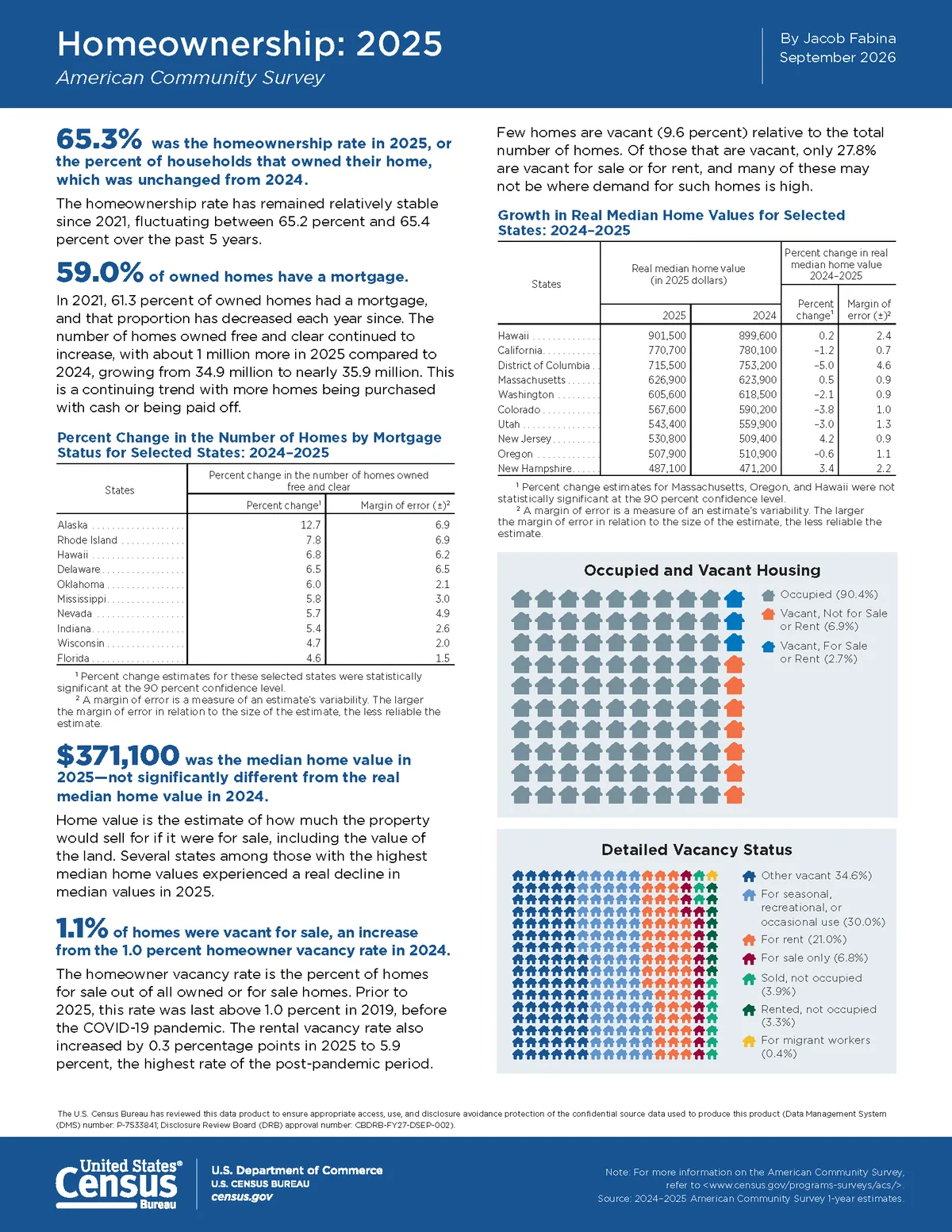
Credit: Homeownership: 2025, U.S. Census Bureau. Shown for commentary and curation.
This brief leads each section with a large blue figure followed by a bold sentence that explains it. Tables and two house icon charts fill the rest of the page. It names the author and the month in the header, like a report would.
Steal this: Start every block with the number and a full sentence, then add the detail.
18. U.S. Census Bureau: Housing Costs 2025
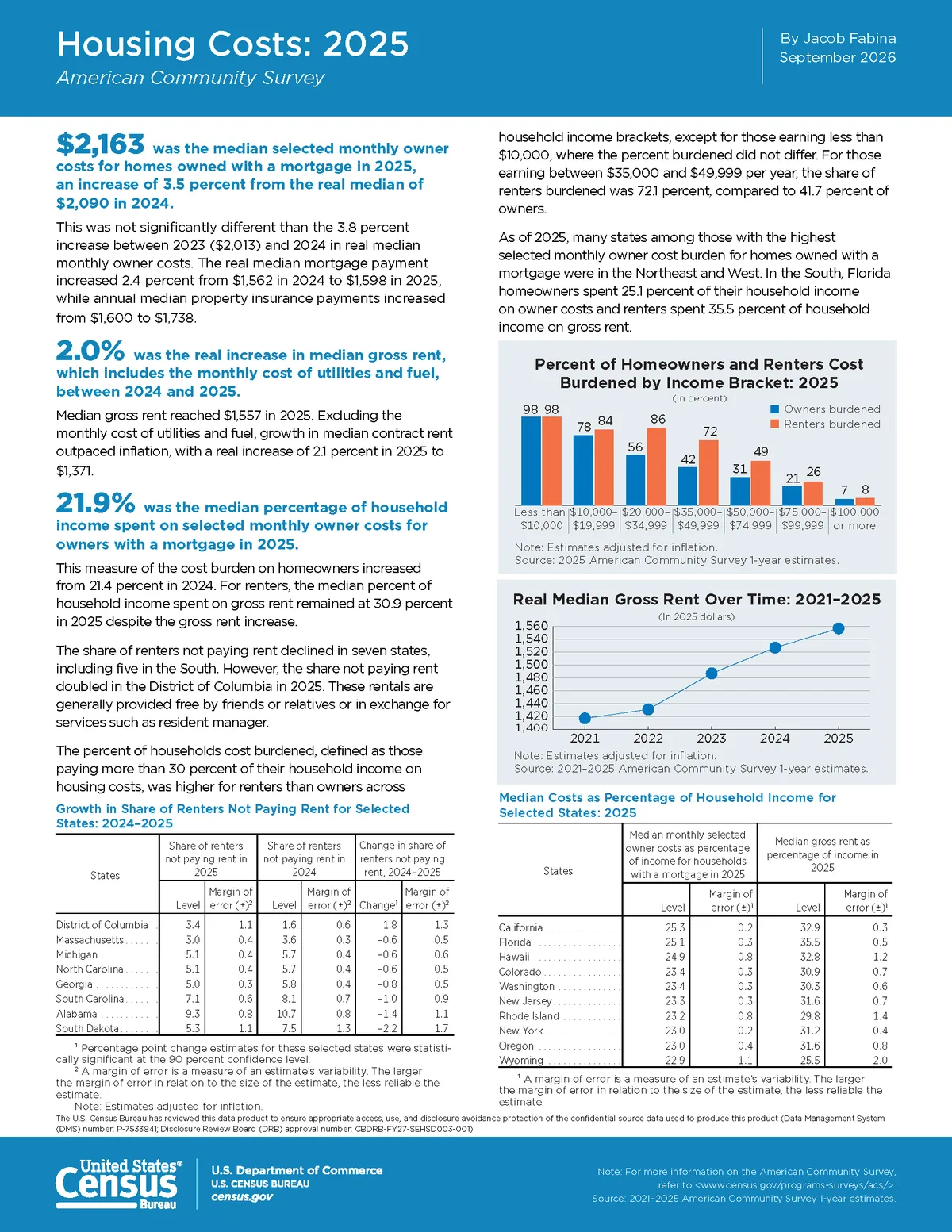
Credit: Housing Costs: 2025, U.S. Census Bureau. Shown for commentary and curation.
The sister brief uses the same template with three highlighted figures, a grouped bar chart for owners and renters, and a line chart of rent over five years. Because it matches example 17, a reader who learned one can scan the other in seconds.
Steal this: Build one report template and reuse it across a series.
Process Infographics
Process infographics show steps or a sequence. Numbered panels let the reader follow time without a single axis.
19. NASA: Chemistry in Titan's Atmosphere
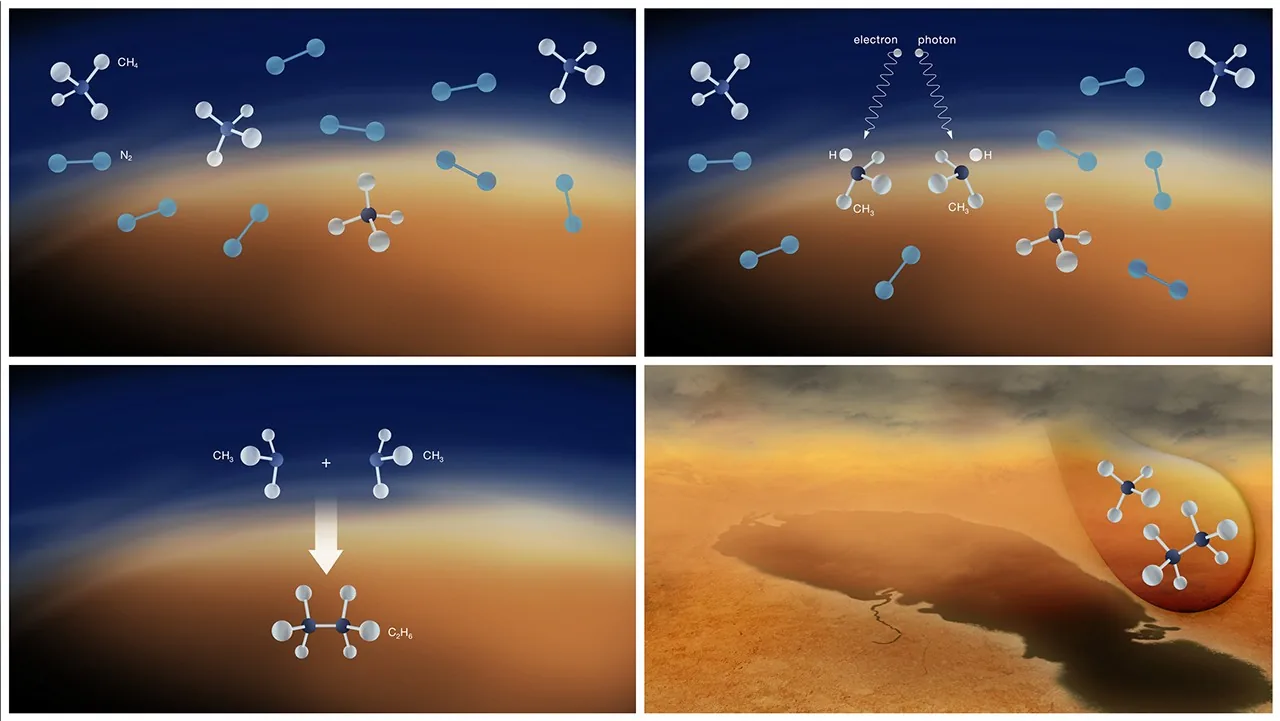
Credit: Chemistry in Titan's Atmosphere, NASA. Shown for commentary and curation.
This NASA graphic walks through one chemical cycle in four panels. Molecules are labeled, an arrow shows two of them combining, and the last panel drops to Titan's surface. There's almost no text, so the drawings carry the story.
Steal this: Give each panel one change only, so the sequence explains itself.
20. NASA: Planetary Engulfment Sequence
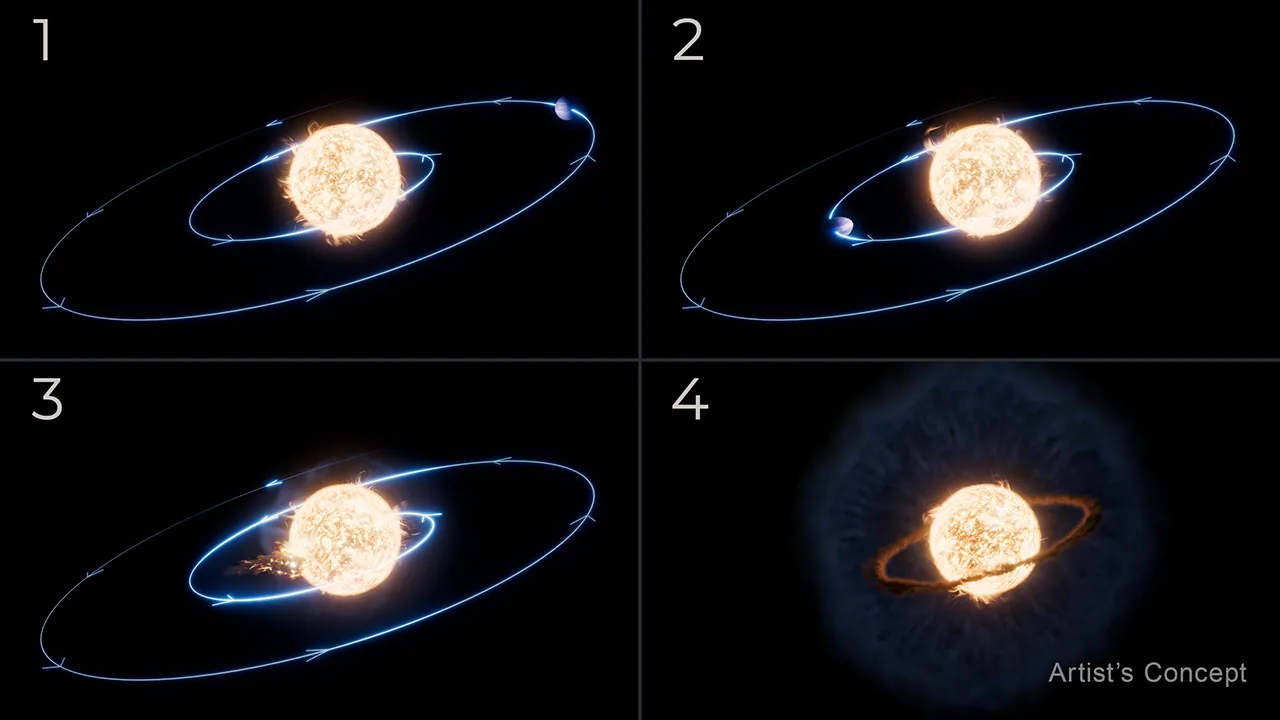
Credit: Planetary Engulfment Illustration, NASA. Shown for commentary and curation.
This sequence numbers its four panels in large white digits. A planet's orbit shrinks across panels one to three, and panel four shows what's left around the star. It's labeled as an artist's concept, which tells readers how literally to take it.
Steal this: Number the panels and label illustrations as concepts when they aren't data.
21. NASA: Stacking the SLS Boosters
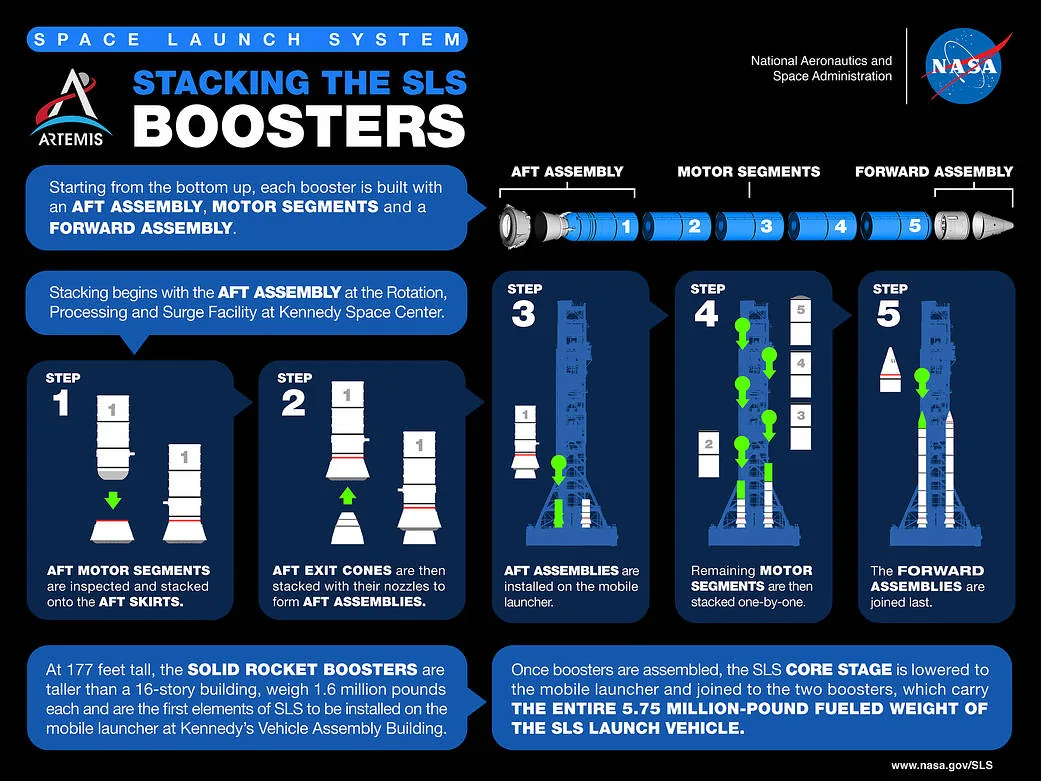
Credit: Stacking the SLS Boosters, NASA. Shown for commentary and curation.
NASA's booster graphic shows the booster parts in a row at the top, then five numbered step cards. Each card has a small diagram and one bold sentence. Green arrows show where each part goes.
Steal this: Show the finished parts first, then the steps that assemble them.
Informational Infographics
Informational infographics explain a topic without much data. Plain language matters more than charts.
22. WHO South-East Asia: What Is Human Metapneumovirus?
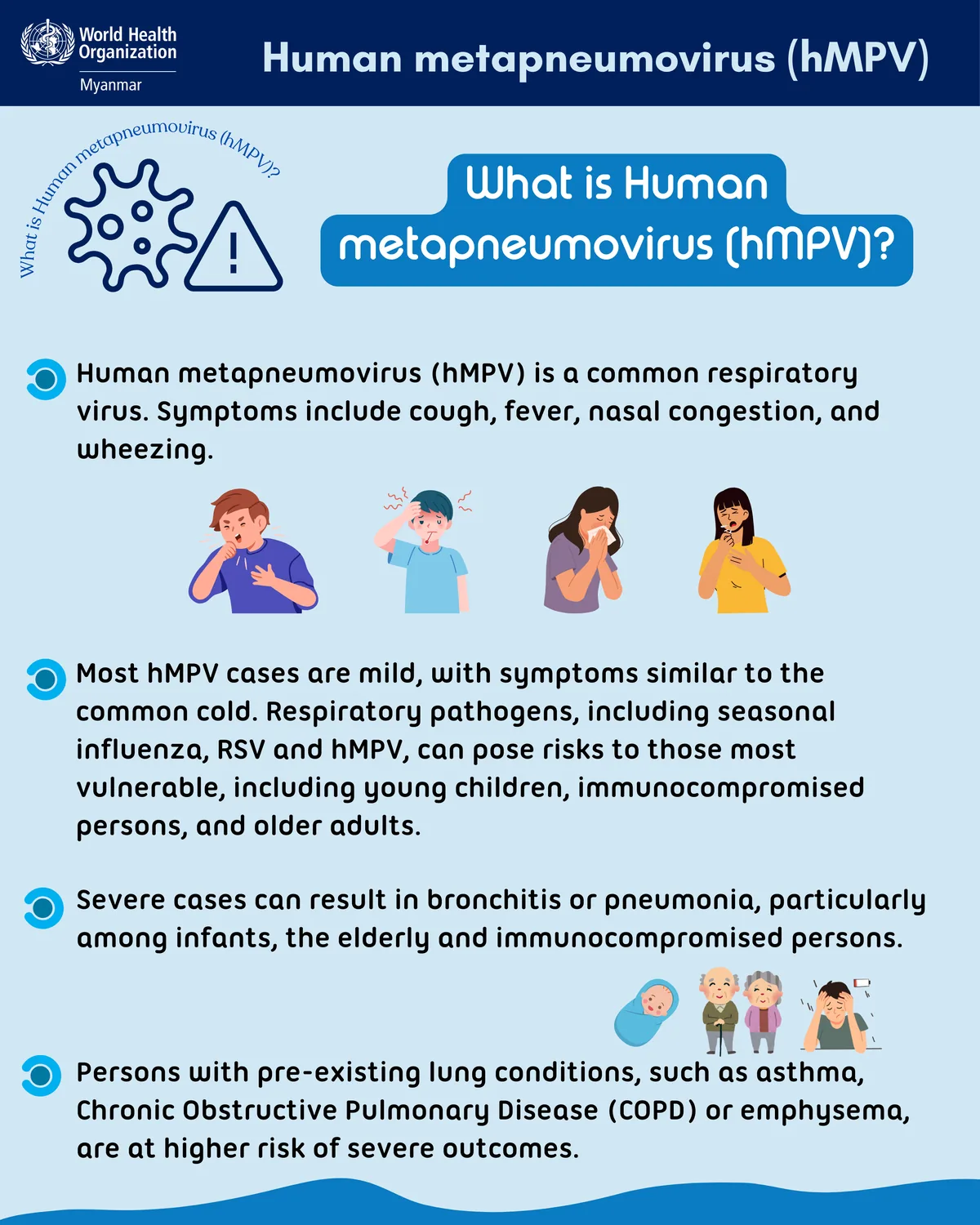
Credit: What Is Human Metapneumovirus (hMPV)?, WHO South-East Asia. Shown for commentary and curation.
This WHO explainer asks its question in the headline and answers in four short points. Simple illustrations show the symptoms and who's most at risk. The language suits a public audience, with no jargon left unexplained.
Steal this: For public health or support content, write each point as one short sentence a nonexpert can repeat.
Anatomy Infographics
Anatomy infographics label the parts of one object. They help when the reader can't see inside the thing.
23. NASA: Inside the SLS Core Stage
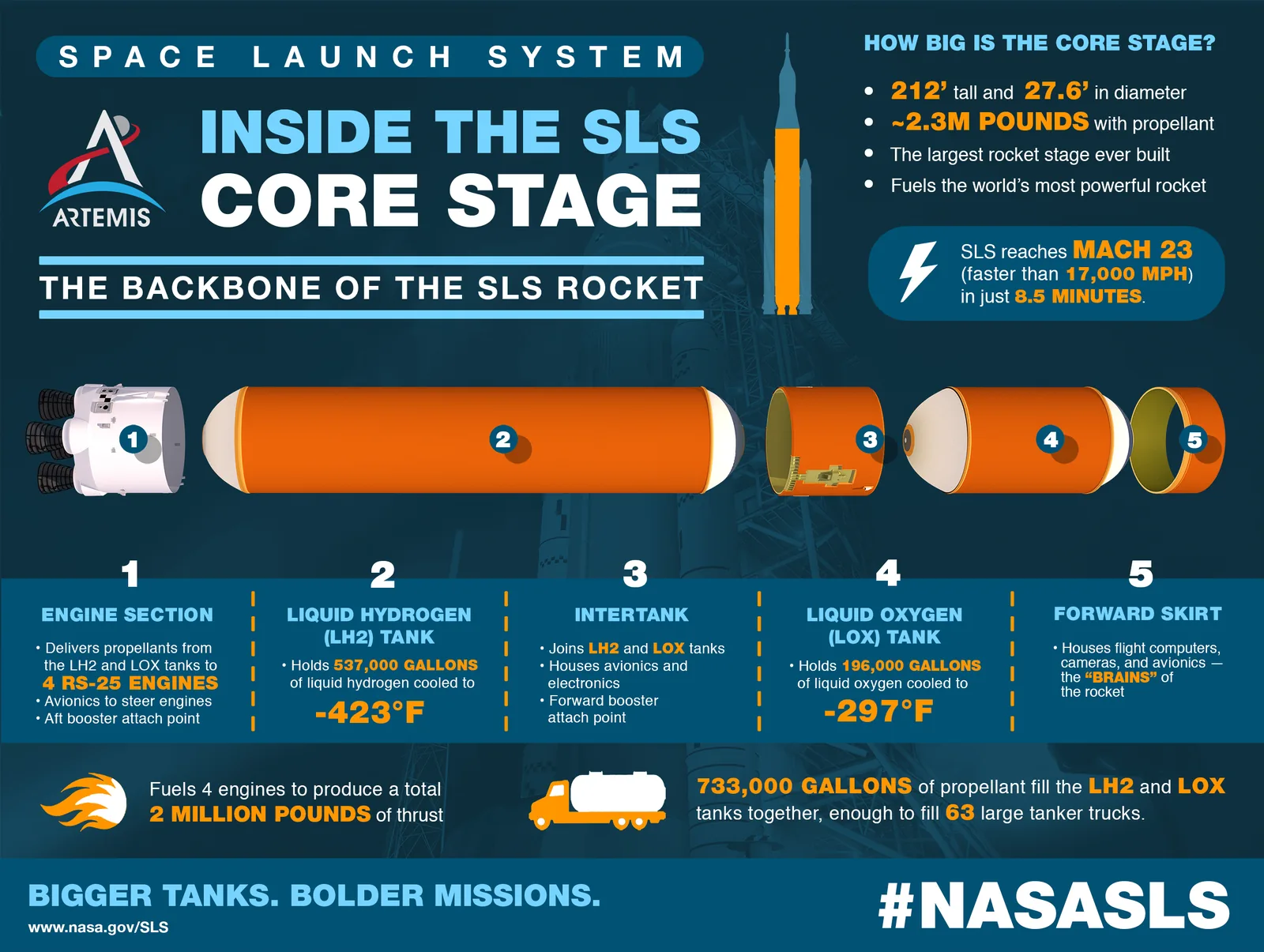
Credit: Space Launch System infographics gallery, NASA. Shown for commentary and curation.
NASA's core stage graphic pulls the rocket stage apart into five numbered sections, each with a short description below. A corner box gives the stage's size, and a tanker truck icon turns propellant volume into something people can picture.
Steal this: Translate big numbers into a familiar object, such as tanker trucks.
24. NASA: Designed for Deep Space
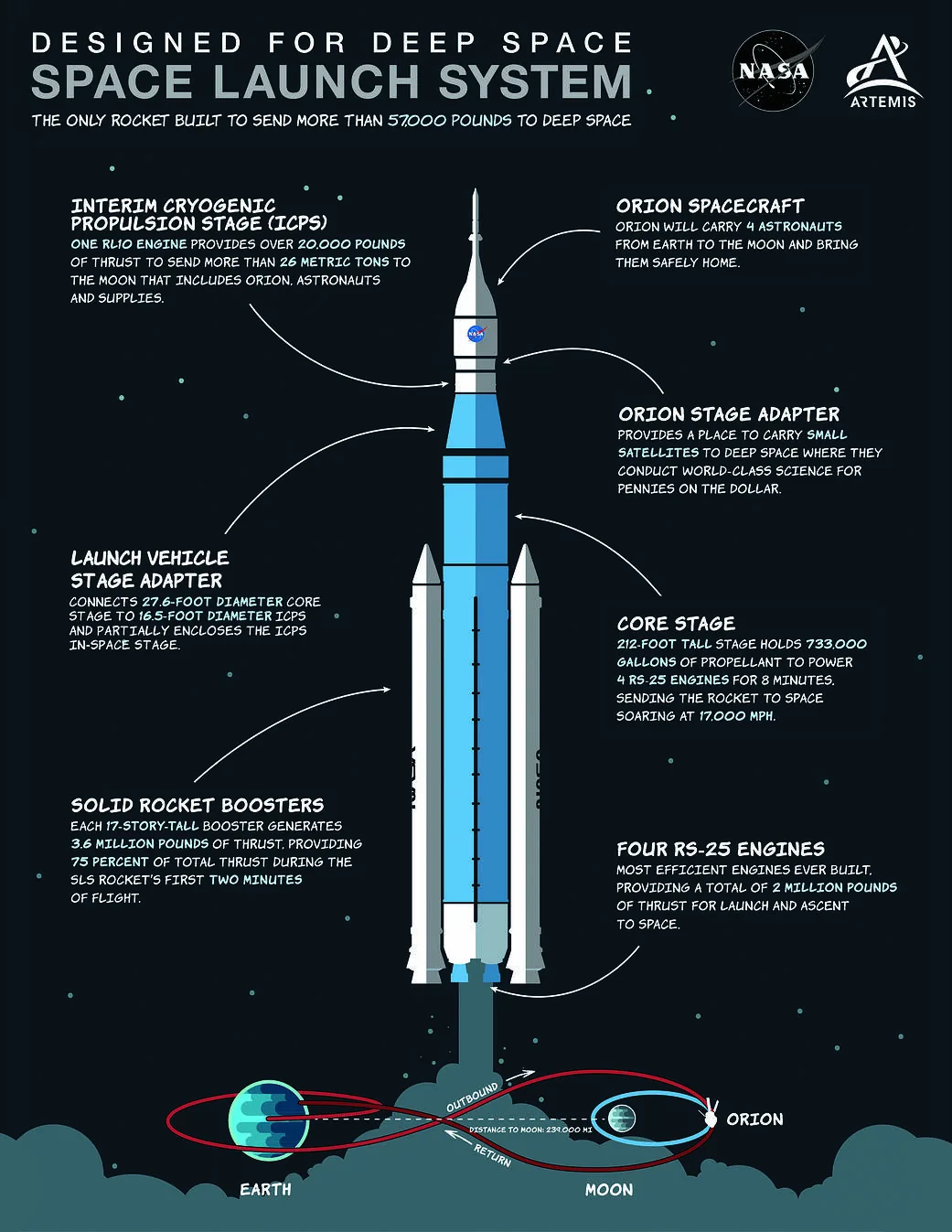
Credit: Designed for Deep Space: Space Launch System, NASA. Shown for commentary and curation.
This annotated diagram stands the rocket in the center with curved arrows to labels on both sides. Each label has a heading and two or three lines of detail. A small Earth to Moon loop at the bottom shows where the rocket goes.
Steal this: Alternate labels left and right so lines never cross.
Timeline Infographics
Timelines show change over time. They work best when time runs in one clear direction.
25. NASA: Exoplanet Missions
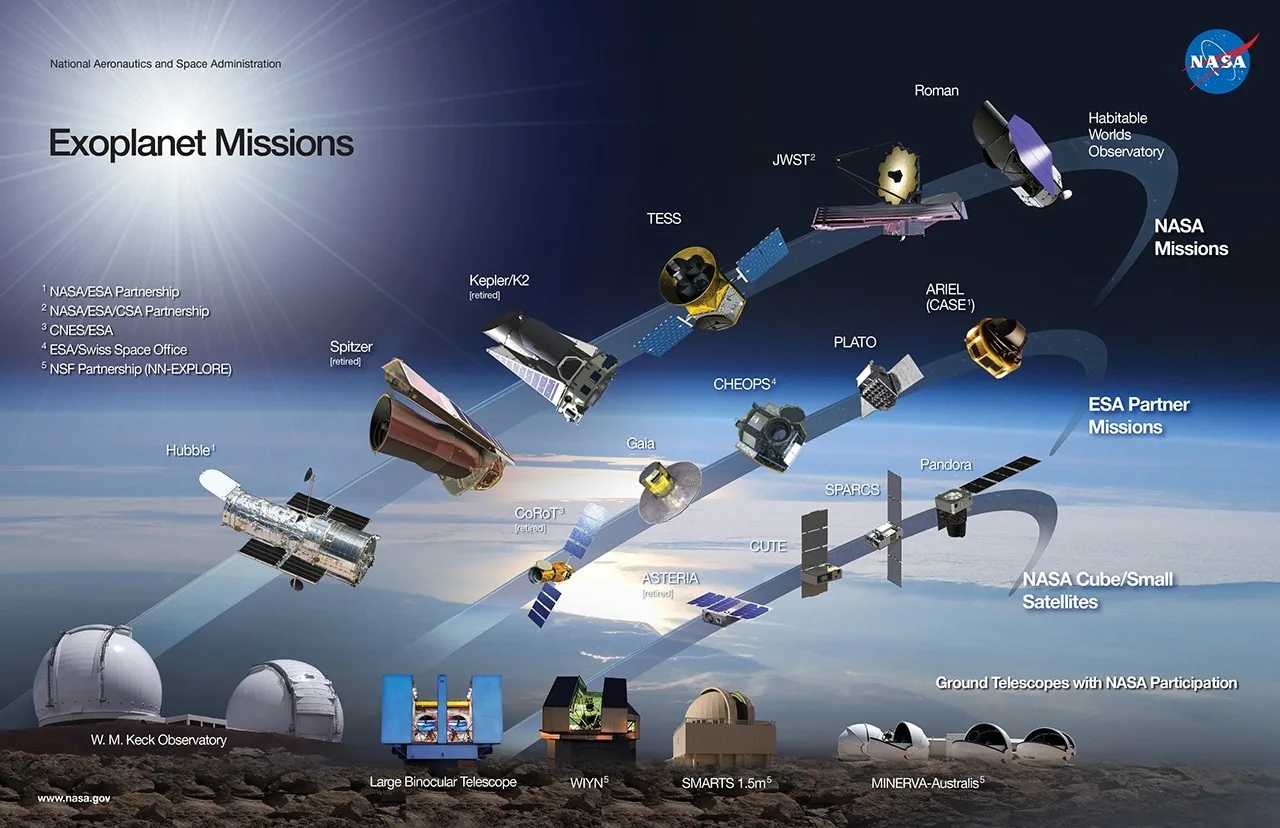
Credit: Exoplanet Missions, NASA. Shown for commentary and curation.
NASA's exoplanet graphic places spacecraft along three rising arcs, with older and retired missions low on the left and future ones high on the right. Separate arcs split NASA, ESA partner, and small satellite missions. Ground telescopes line the bottom. It's dated December 2022 in the file name, so check the source for newer missions.
Steal this: Use separate tracks when one timeline holds different kinds of items.
Diagram Infographics
Diagram infographics show how things relate in space or structure.
26. NASA: Operating and Future Science Fleet
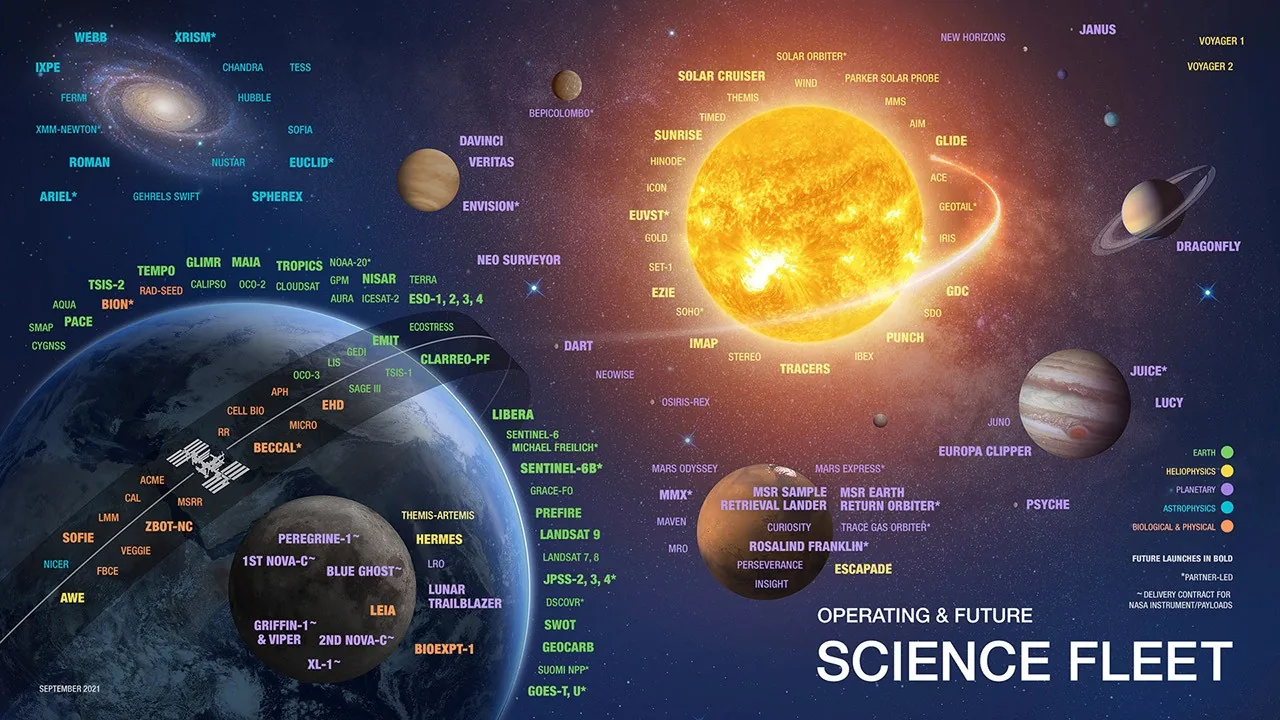
Credit: NASA's Science Fleet, NASA. Shown for commentary and curation.
The science fleet diagram places every mission name near the body it studies, so position carries the meaning. Colors mark the science division, and bold type marks future launches. It's dense and dated September 2021, but it shows how far a single diagram can stretch.
Steal this: If location explains the relationship, use position before you add any chart.
Financial Results Infographics
Companies publish results infographics so nonfinancial readers can see the headline numbers without the full filing.
27. Arm: Q4 FYE25 Financial Results
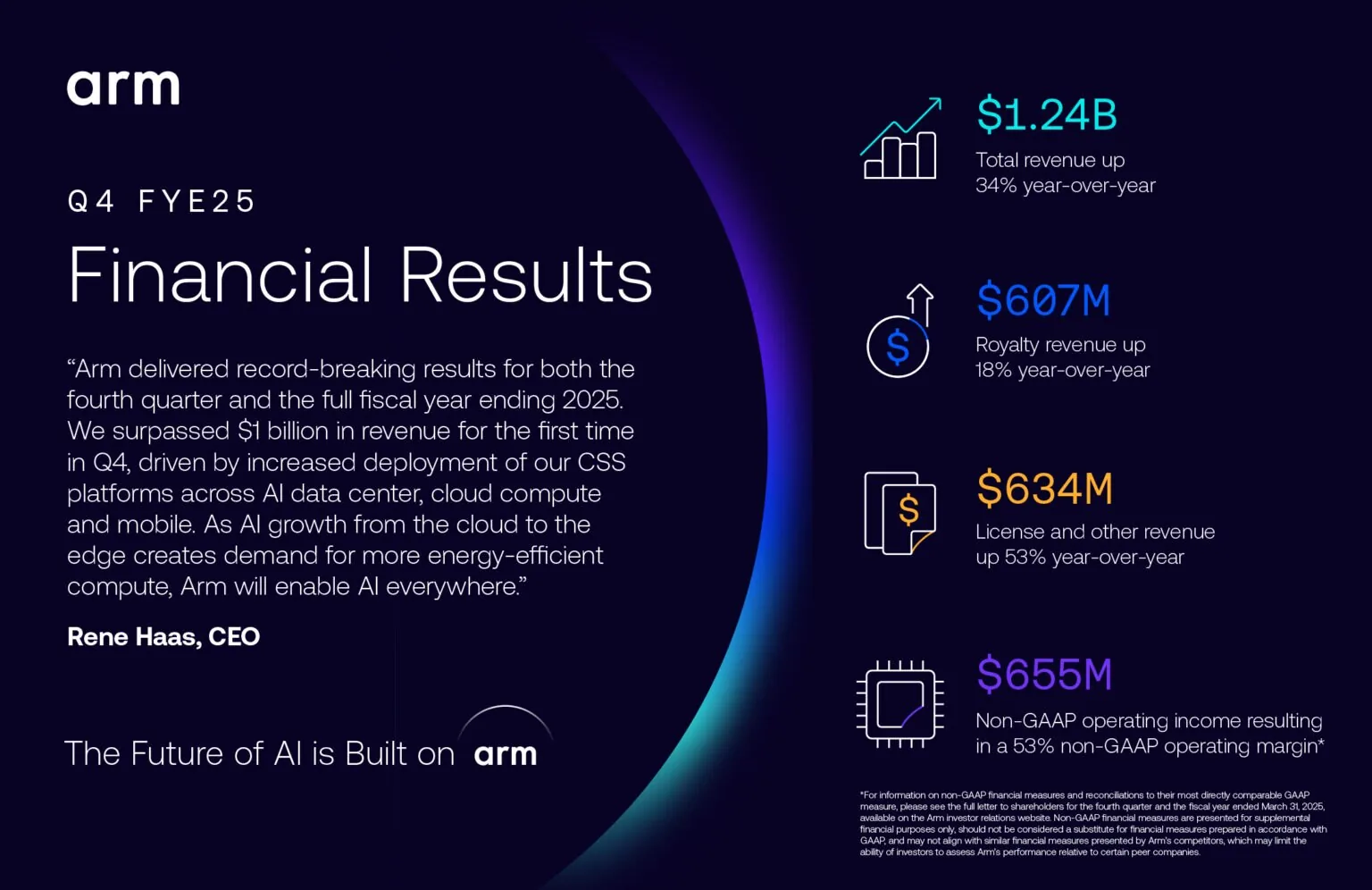
Credit: Arm Q4 FYE25 Financial Results, Arm Newsroom. Shown for commentary and curation.
Arm's results graphic sets the CEO's quote on the left and four headline figures on the right, each with a line icon and a short label. The dark brand background and gradient arc make it look like Arm, not like a spreadsheet. The fine print explains its non GAAP figures.
Steal this: Pair the numbers with one human quote, and keep the required footnotes on the graphic.
28. Panasonic: FY2025 Results and FY2026 Forecast Key Points
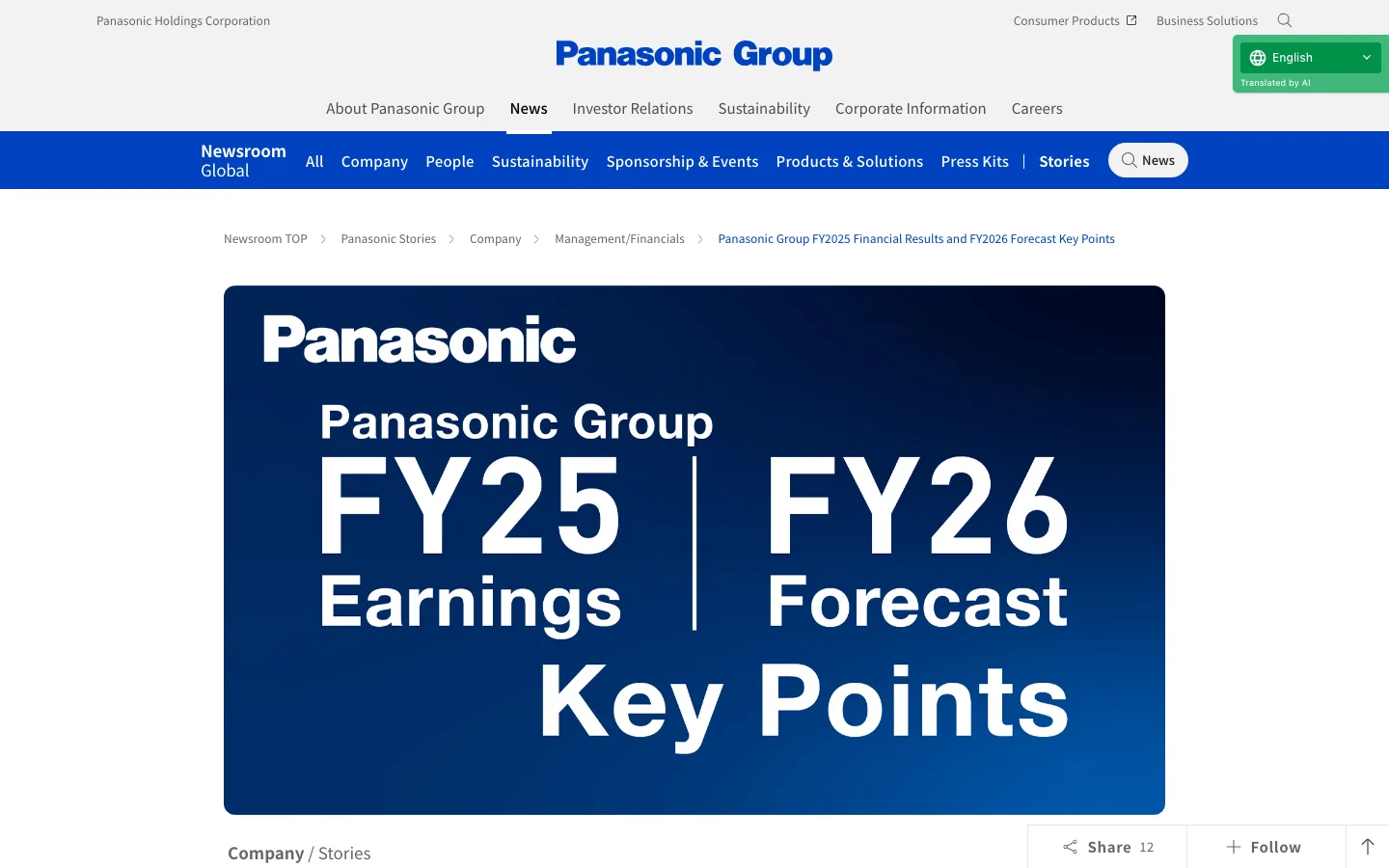
Credit: Panasonic Group FY2025 Financial Results and FY2026 Forecast Key Points, Panasonic Newsroom. Shown for commentary and curation.
Panasonic's newsroom story puts the results and the next year's forecast side by side in one banner, then explains the key points below. Our screenshot shows only the top of the page, so open the source to see the full graphics.
Steal this: Show last year's results next to next year's forecast, so readers get the direction as well as the score.
29. Accenture: Earnings Infographic
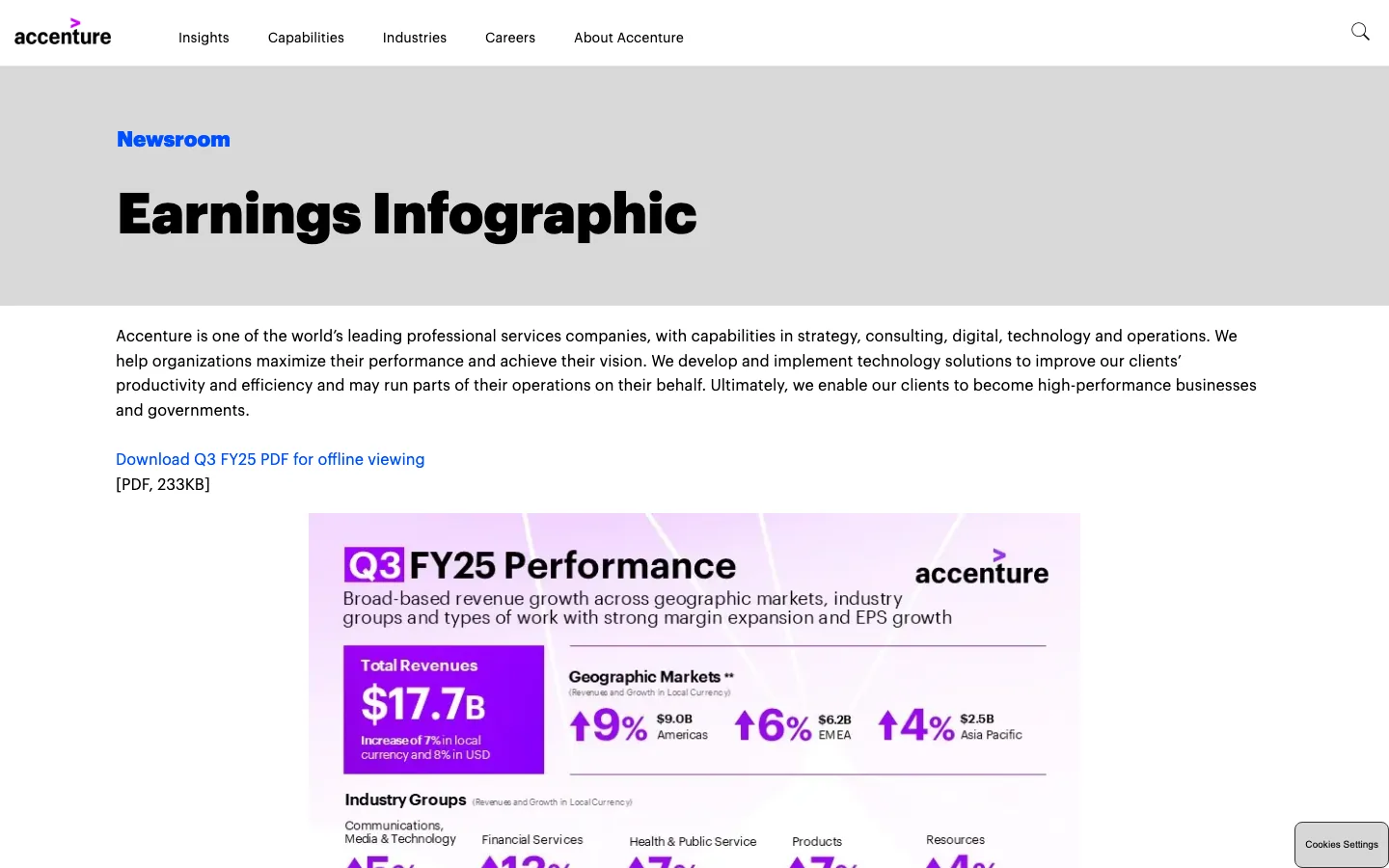
Credit: Earnings Infographic, Accenture Newsroom. Shown for commentary and curation.
Accenture's earnings page hosts a quarterly results graphic with a PDF download link above it. The graphic opens with one purple total revenue block, then growth arrows by geography and industry group. Our screenshot shows only the top, and the page updates each quarter.
Steal this: Keep one permanent URL for a recurring infographic and update it every quarter.
Year in Review Infographics
Year in review graphics collect a year's milestones in one place. They suit newsrooms, LinkedIn, and investor updates.
30. CASCINATION: CAS-One IR 2025 Summary

Credit: CAS-One IR: 2025 Summary, CASCINATION. Shown for commentary and curation.
CASCINATION's 2025 summary is a long dark scroll that starts with a big "2025, a year of achievements" heading. Short milestone lines, organ icons, and a world map of centers come first, then people, events, and a webinar. Each section has a plain heading, so readers can skim.
Steal this: Order a year in review from the biggest outcome down to events and people.
Sustainability Infographics
Sustainability infographics summarize targets and progress. They're often lifted straight from an annual report.
31. Mondi: 2025 Performance at a Glance
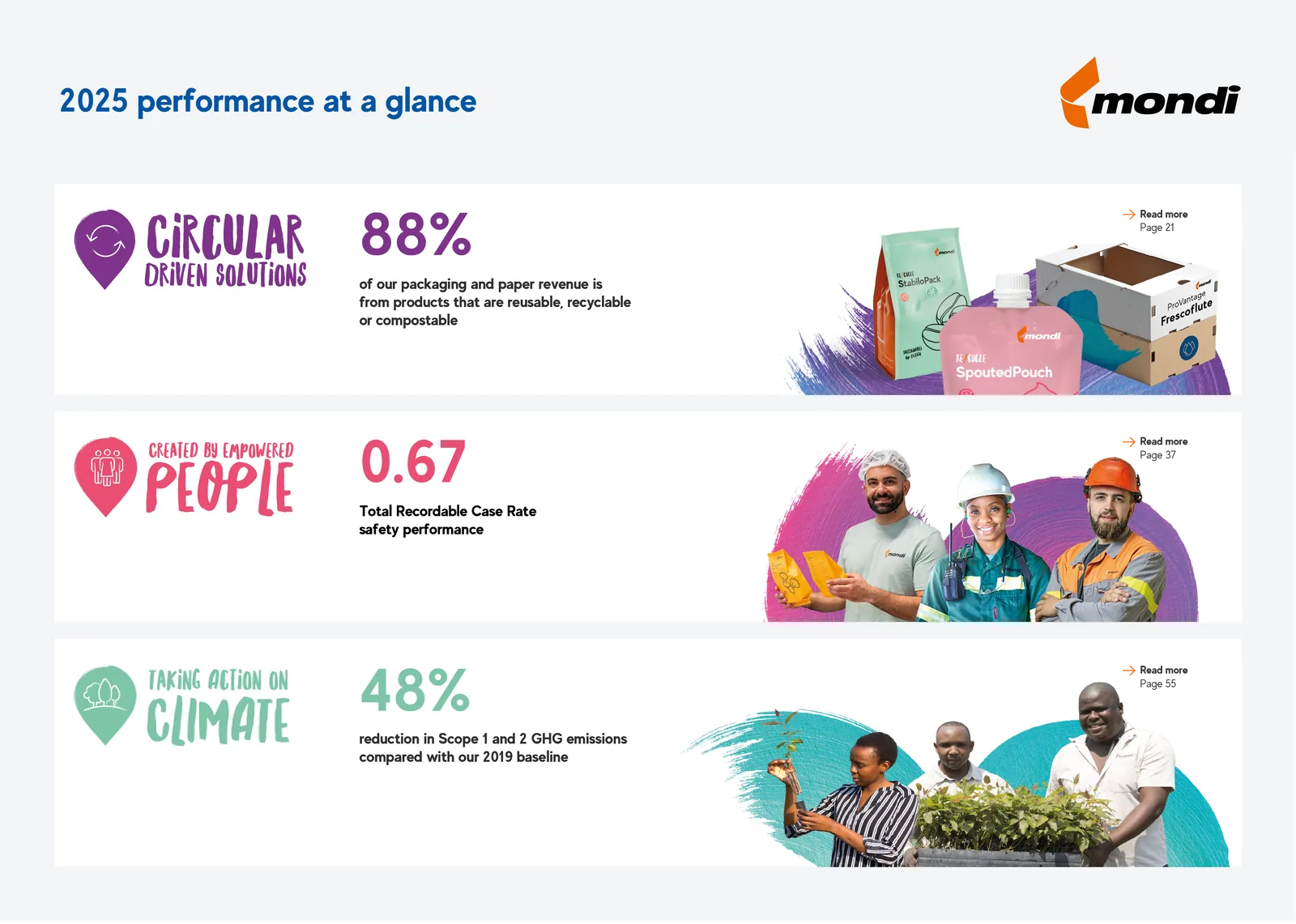
Credit: 2025 Performance at a Glance, Mondi. Shown for commentary and curation.
Mondi's at a glance graphic has three rows, one per pillar of its strategy. Each row pairs a colored pillar name, one large metric, a one line explanation, and a photo. Three pillars, three numbers, nothing else.
Steal this: Give each strategic pillar exactly one headline metric.
32. Mondi: Sourcing Our Wood Responsibly
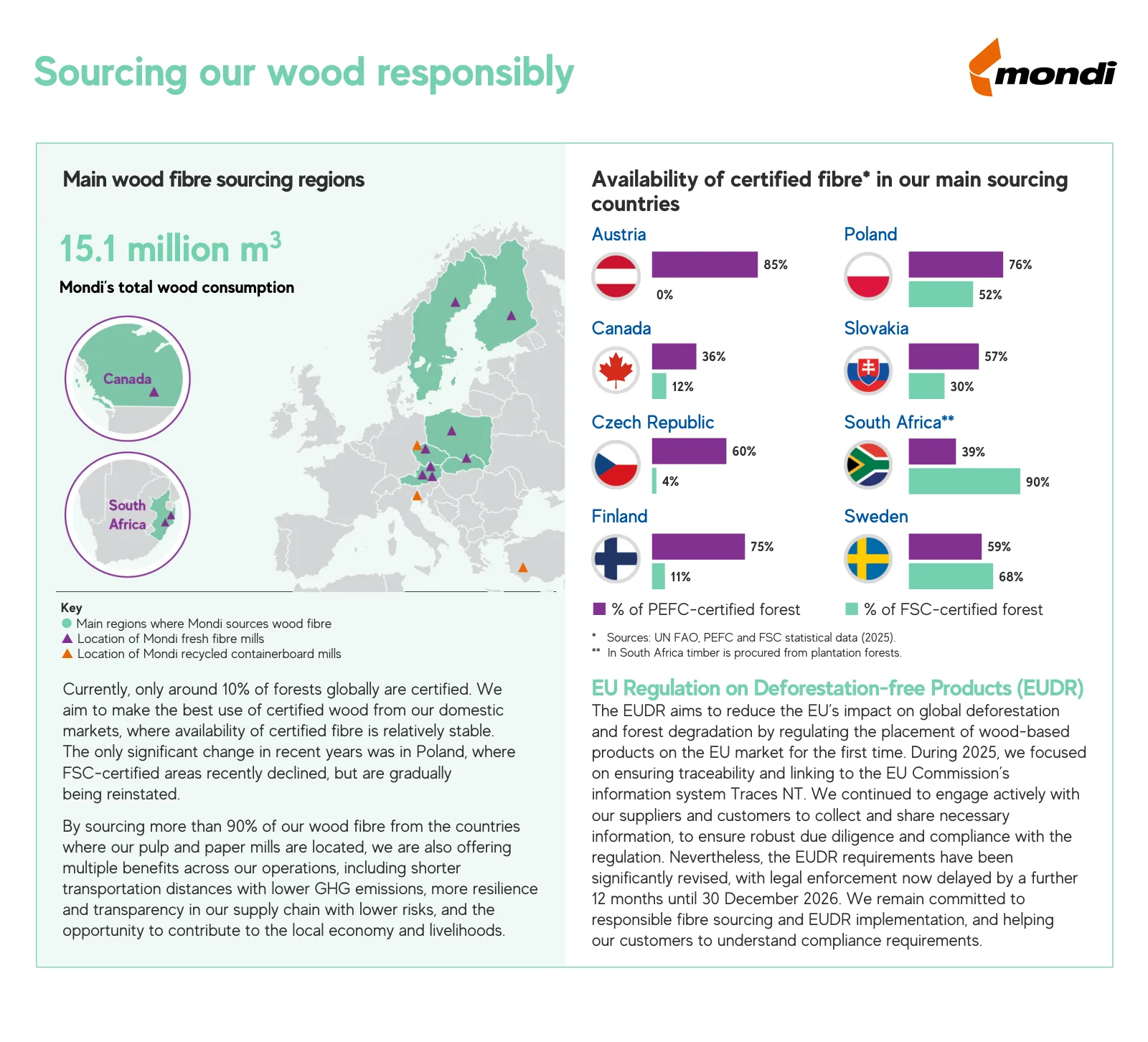
Credit: Sourcing Our Wood Responsibly, Mondi. Shown for commentary and curation.
This Mondi fact sheet combines a map of sourcing regions and mills on the left with paired bar charts by country on the right. Purple and mint bars compare two certification schemes. Short paragraphs below explain the context, including EU deforestation rules.
Steal this: When one chart can't explain the issue, pair a map with a chart and add two short paragraphs.
What 32 Infographics Have in Common
We reviewed all 32 side by side. Here's what repeats, counted from the gallery itself.
| Pattern | Count (of 32) |
|---|---|
| From a public body (Census Bureau, NASA, WHO) | 22 |
| From a company or industry group | 10 |
| Statistical or survey based | 11 |
| Process, anatomy, timeline, or diagram | 7 |
| Square file, ready for social feeds | 9 |
| Portrait or long vertical file | 9 |
| Landscape file | 11 |
| Page screenshots (graphic shown only in part) | 3 |
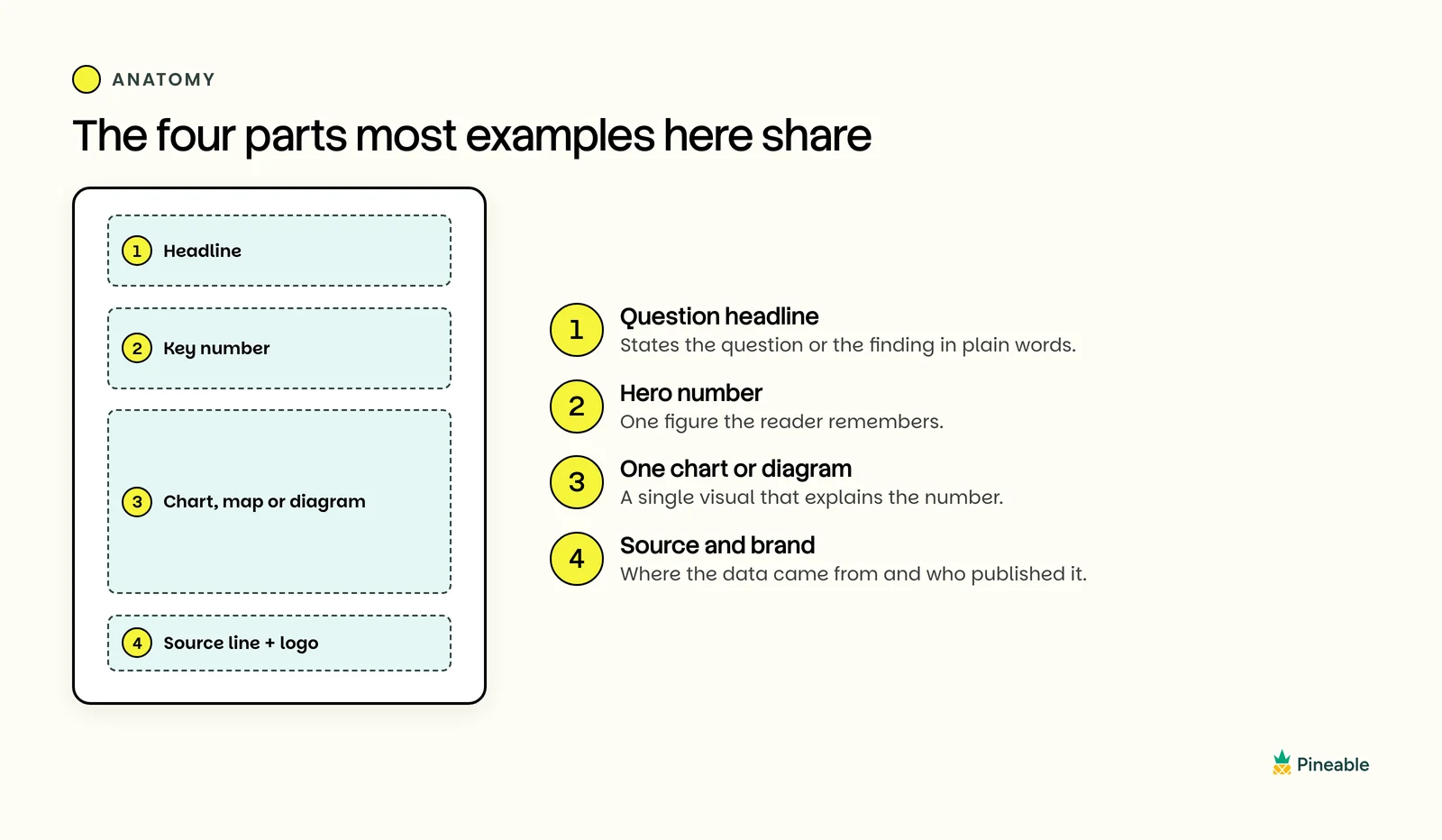
The four zones that repeat across the government and brand examples in this gallery.
Four zones show up again and again, especially in the data examples:
- A headline that states the question or the finding. Examples 2, 16, and 22 ask a question; examples 6 and 7 state the answer.
- A hero number. Examples 4, 6, 7, 8, 27, and 31 make one figure the biggest thing on the page.
- One chart, map, or diagram. Examples 2, 12, and 16 each use a single visual for a single question.
- A source line and a small logo. All 14 Census Bureau graphics put both in a footer band.
The layout follows the question type. "How much" gets a bar chart, "where" gets a map, "how" gets numbered steps, and "what's inside" gets labeled parts.
Templates matter more than we expected. The Census Bureau reuses a handful of layouts, so examples 5, 6, and 7 look like a family, and so do 17 and 18. NASA's SLS graphics share a dark navy palette. A template makes the second infographic faster to design and faster to read.
Format follows the channel. Square files suit social feeds, long vertical files from Capgemini and CASCINATION suit scrolling on a phone, and landscape files suit slides and articles. Pick the channel first, then the shape.
How to Review an Infographic Before You Publish
Use these eight checks, drawn from what the strongest examples above do, before any infographic goes live.
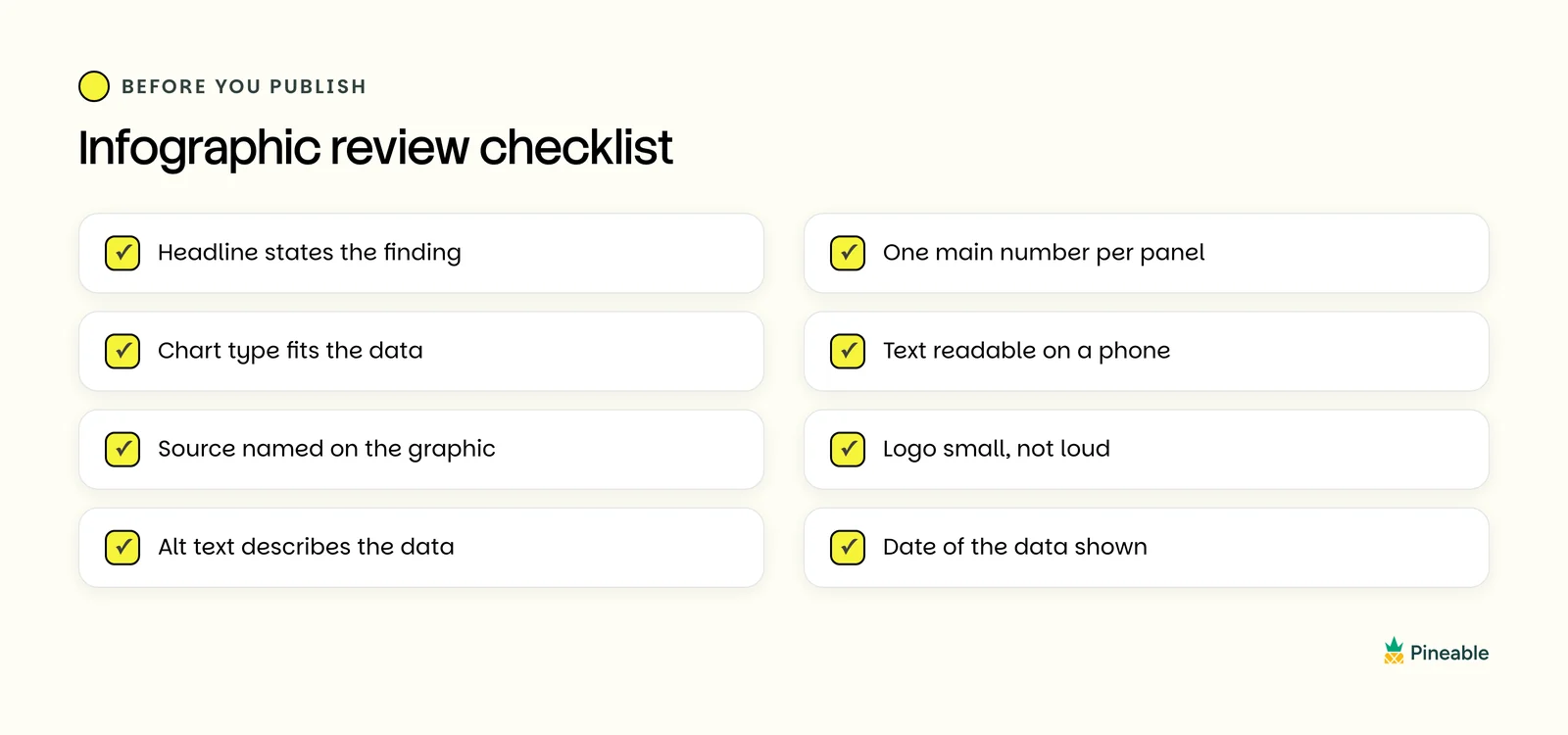
Eight checks drawn from what the strongest examples in this gallery do.
- Headline states the finding. Write the answer, not the topic.
- One main number per panel. If two numbers compete, split the panel.
- Chart type fits the data. Bars for ranking, maps for location, lines for trends.
- Text readable on a phone. Zoom your export to phone width and read every label.
- Source named on the graphic. Screenshots travel without your article.
- Logo small, not loud. The Census footer band is the model.
- Alt text describes the data. Say what the chart shows, not "infographic."
- Date of the data shown. Readers need to know how fresh the numbers are.
What is a good infographic?
A good infographic answers one clear question with real, sourced data. It has a headline that states the finding, one main chart or diagram, and a source line. The Census Bureau's manufacturing graphic is a strong model: one question, one sorted bar chart, one source.
What is the typical size of an infographic?
There is no single standard size. Social infographics are often square, and several Census Bureau graphics in this gallery are 1080 by 1080 pixels. Long scroll infographics are tall and narrow, while slide and article graphics are usually landscape. Choose the size from the channel you publish on.
What do infographics do?
Infographics make information faster to understand. They turn data, steps, or parts into visuals, so a reader gets the main point in seconds. Teams use them to summarize reports, explain processes, share results, and give social posts a reason to be saved.
What is another term for infographic?
Common alternatives are data visualization, information graphic, visual summary, fact sheet, and explainer graphic. A data visualization is usually one chart, while an infographic combines charts, icons, and text to tell a short story.
What are the main types of infographics?
The main types are statistical, survey results, map, list, comparison, report summary, process, informational, anatomy, timeline, diagram, financial results, year in review, and sustainability. Pick the type from the reader's question: how much, where, when, how, or what's inside.
Where can I find real infographic examples?
Government sites such as the U.S. Census Bureau and NASA publish many free, sourced infographics. Company newsrooms and sustainability report pages are good sources for brand examples. Pineable's design gallery collects real marketing designs by type and industry.
Want more inspiration for your next graphic? Browse the Pineable design gallery for real marketing content by type and industry.
Summarize this article with AI:
 ChatGPT
 Perplexity
 Claude
 Grok
Grok

Written by
Taher BatterywalaFounder & Chief Curator
Taher Batterywala is a creative marketer who loves to write & design content that organically drives conversions. He is the creator of Pineable, the world's first content marketing design inspiration hub. He regularly shares his thoughts about content design, SEO, and marketing. As a true cinephile, he admires movies above anything else.
