Product photography is super important in eCommerce. Stats show that 75% of online shoppers rely on product photos to decide whether to buy. And products with high-resolution images see a 33% higher conversion rate compared to those with low-quality visuals.
The problem is that traditional product photography is expensive, slow, and hard to scale. A single shoot can run anywhere from $500 to $2,000. If you’re launching 50 new SKUs per season, that’s $25,000 to $100,000 just on photography. For most eCommerce brands, especially early-stage ones, they don't have massive budgets to spend on product photos.
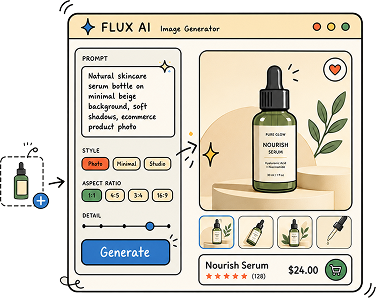
So what's the alternative? AI photo generators. These tools can remove backgrounds, generate lifestyle scenes, place products on AI fashion models, create ad variations, and process thousands of images in batch. All without a studio, a photographer, or a three-week turnaround.
We’ve researched and picked 20+ of the best AI photo generators for ecommerce products, covering free tools, budget options, and enterprise platforms. Whether you sell fashion, beauty, electronics, food, or home goods, there’s a tool here that fits your workflow and budget.
What to Look For in an AI Product Photo Generator
Not every tool works for every use case. Before you pick one, here's what matters most for eCommerce:
Image quality and product accuracy. The AI should preserve your product's real details, textures, colors, and logos. If it warps or distorts the actual item, it's useless for eCommerce no matter how pretty the background looks.
Background generation and lifestyle scenes. The best tools go beyond simple background removal. They place your product in realistic environments, kitchens, living rooms, outdoor settings, that help customers visualize ownership.
AI model and virtual try-on support. For fashion and apparel, this is critical. 95.6% of fashion brands use model photography as their primary style. AI tools that generate realistic on-model shots save thousands per collection.
Batch processing and API access. If you're managing hundreds or thousands of SKUs, you need tools that process images in bulk and integrate into your existing workflow via API.
Marketplace and platform integration. Direct connections to Shopify, Amazon, and social platforms save time on resizing, formatting, and exporting.
Pricing that makes sense at your scale. Some tools charge per image, others per month with unlimited generations. Know your volume before committing.
Best AI Photo Generators for Ecommerce Products
Check out the most popular and highly rated tools for creating high quality product photos and ad creatives for your online Commerce business:
1. Claid.ai
Claid is a comprehensive AI photo studio built for eCommerce. It handles background removal, lifestyle scene generation, image enhancement, and on-model fashion shots from a single dashboard. Its Custom AI feature lets you train a personalized model on your products for consistent outputs. API and batch processing make it scalable for large catalogs.
Best for: Mid-size to enterprise brands needing an end-to-end product photography workflow.
Pricing: Starts at $9/month. Professional plan at $49/month. Free tier with 20 credits/month.
2. Photoroom
This AI app is a mobile-first AI photo editor designed specifically for marketplace sellers. It excels at going from raw product photo to listing-ready image in a few taps: background removed, lighting cleaned up, centered, resized, and exported. Templates are tuned for Amazon, Etsy, Shopify, and social platforms. The AI fashion model feature supports diverse body types and poses.
Best for: Individual sellers and small teams who edit on mobile. Strong for marketplace listings.
Pricing: Free plan (250 exports/month). Pro starts at $9.99/month.
3. WeShop
WeShop AI is a creative studio trusted by over 1 million users on Shopify, Amazon, and Etsy. It covers AI product photography, background removal, image enhancement, virtual try-on, and custom AI model generation. The interface is polished and the feature set is broad.
Best for: Fashion and lifestyle brands selling across multiple platforms.
Pricing: Free tier with 200 credits. Paid plans start at $9.90/month.
4. HummingBytes
HummingBytes helps ecommerce sellers turn a single rough product photo into channel-ready images and short videos. Instead of setting up expensive photoshoots, sellers can instantly generate Amazon listing sets, TikTok Shop galleries, infographics, lifestyle shots, and ad creatives directly from their existing product photos.
Best for: Ecommerce brands and marketplace sellers who need to quickly scale their visual assets across different platforms without a traditional photoshoot budget.
Pricing:
• Starter: $12/month (1,200 credits)
• Creator: $29/month (2,900 credits)
• Pro: $59/month (5,900 credits)
5. WearView
WearView is built for one job: turning garment photos into on-model fashion photography. Upload a flat-lay or product shot and it puts the piece on a realistic AI model, with control over the model's look, pose, and background. You can keep the same model across an entire collection, so your product pages read like one photoshoot instead of a patchwork. Pro plans also generate short on-model videos for reels and product pages.
Best for: Fashion brands and boutiques that need consistent on-model photos and video across a full catalog.
Pricing: Lite starts at $29/month (50 credits). Pro at $49/month (200 credits) adds video generation and priority processing.
6. SetSet
Setset Studio is a self-serve AI photography app built only for fashion. Upload a garment - no prompting - pick a preset look from a library developed with fashion photographers, and get catalog-ready on-model images and video in minutes. What separates it from general product-photo tools is fashion precision: garment detail and styling survive generation, the same model identity carries across an entire collection, and batch runs cover a whole drop instead of one image at a time. Brands using it include Happy Socks, MAAP, TWP Clothing and MZ Wallace. Its image-to-video feature has driven a 4% conversion lift on product pages.
Best for: Fashion and apparel brands that need on-brand, consistent imagery at collection scale - from a first drop to a full catalog.
Pricing: Free to start; plans from ~$1,000/year. Fully managed production available for high-volume catalogs.
7. Caspa AI
This is an all-in-one platform that generates lifestyle scenes with human models, props, and natural environments. It also handles background removal, branding overlays, and cross-platform export optimization for Facebook, Instagram, and Amazon. Enterprise-ready with scalability for thousands of SKUs.
Best for: Brands that need lifestyle imagery with realistic model integration.
Pricing: Starts at $29/month for individuals. Enterprise pricing available.
8. PixelPanda
PixelPanda turns one product photo into a full set of ecommerce visuals: clean studio shots, lifestyle scenes, on-model and try-on images using 111 ready-made AI models, and short UGC-style videos with an AI presenter. It also bundles the everyday cleanup tools (background removal, upscaling, text removal) and can publish finished images straight to Shopify, WooCommerce, Etsy, and other storefronts. Free tools let you test it before paying.
Best for: Small and mid-size brands that need on-model, lifestyle, and video content from a single product image without booking a photoshoot.
Pricing: Free tools and a free first AI model. Paid plans from $7/month (100 credits); Starter at $24/month (1,125 credits). One-time credit packs from $1.99.
9. Pebblely
Pebblely is a beginner-friendly AI background generator. Upload a product photo, pick a theme, and get a styled lifestyle background in seconds. It has a clean interface, pre-built prompt library, and mobile app. Generous free tier makes it accessible for small sellers.
Best for: Small businesses, DTC brands, and anyone testing AI product photography for the first time.
Pricing: Free plan (40 images/month). Starter: $19/month. Pro: $39/month.
10. Pixelcut
This one's a Canva killer, offering a Canva-like editing experience for product photos. Background removal, AI-powered templates, resizing for different platforms, and a strong mobile app make it practical for quick edits. The free plan has no credit limits for basic features.
Best for: Sellers who need fast, simple edits without a learning curve.
Pricing: Free plan with basic features. Pro: $9.99/month.
11. Design.com
Design.com’s AI image generator turns text prompts into polished visuals within seconds. E-commerce sellers can use detailed prompts to explore product concepts, branded backgrounds, promotional graphics, website banners, and social media content. The tool generates multiple interpretations and lets users refine the subject, setting, lighting, colors, style, and composition before downloading a preferred result. Images can also be combined with logos, brand colors, fonts, and Design.com templates to create finished marketing assets.
Best for: Entrepreneurs and small ecommerce businesses that want an accessible way to create custom product concepts and branded promotional visuals without advanced design experience.
Pricing: Images can be generated without an account. The AI Design Plan starts at $3/month when billed annually and includes 50 AI-generated images per month, AI editing, 50+ design and AI tools, and access to 651,000+ templates.
12. Magic Studio
It provides 20 free product photos per month with basic editing tools, background removal, and template support. It's lightweight and designed for beginners. The dedicated "Product Photos" spin-off adds AI-powered scene generation with theme-based and text-based modes.
Best for: Individuals and tiny businesses experimenting with AI product photography on zero budget.
Pricing: Free (20 images/month). Paid plans from $12/month.
13. Flair.ai
It gives you drag-and-drop creative control over product composition. You can build custom scenes by placing products, props, and backgrounds on a canvas, then let AI fill in the details. Good for brands that want more artistic direction over their outputs.
Best for: Brands wanting precise creative control over product compositions and lifestyle scenes.
Pricing: Free trial with limited credits. Paid plans from $8/month. Pro: $29/month.
14. Mokker
Mokker specializes in instant AI background replacement. Upload a product photo, and Mokker generates dozens of styled backgrounds in seconds. It's fast, focused, and great for creating variations for A/B testing on different marketplaces.
Best for: Sellers who need lots of background variations quickly.
Pricing: Free tier available. Pro plans from $19/month.
15. SellerPic
It combines AI fashion model swaps with video generation, making it strong for social sellers who need both images and video content. Upload a flat-lay or ghost mannequin photo, select from a diverse model library, and generate on-model shots. Virtual try-on is included.
Note for marketers: On-model content is only half the equation for social sellers, turning viewers into repeat buyers increasingly comes down to community and live commerce.
Best for: Fashion sellers on Shopify and social platforms who need on-model content and video.
Pricing: Pay-per-image model starting at $0.15 per image. Shopify app available.
16. Rawshot
An exception tool, Rawshot is a dedicated AI fashion photography studio designed for volume production. It offers 600+ synthetic models, 150+ camera styles, and 1,500+ backgrounds. Collaborative workspaces with approval workflows make it practical for agency teams. A notable feature is C2PA content authentication for EU AI Act compliance.
Best for: Agencies and large fashion brands producing content at scale with team approval workflows.
Pricing: Credit-based. Approximately $0.45 to $0.56 per image.
17. Mockey.ai
Mockey stands out for its AI Photoshoot tool, which generates realistic model shots with accurate draping, folds, and proportions. Many users say it's the first AI tool where they felt comfortable using outputs directly for ads and ecommerce listings.
Best for: Fashion brands that need believable on-model shots for ads and product pages.
Pricing: Free plan available. Paid plans with higher limits.
18. AdCreative.ai
This AI image generator goes beyond product photography into full ad creative generation. It produces product photoshoots, fashion model shoots, stock images, high-conversion text, and video content. The compliance checker reviews ads for brand and platform policy violations before publishing.
Best for: Performance marketing teams producing ad creatives at scale across multiple channels.
Pricing: Starts at $21/month. Professional plans scale with usage.
19. Mintly
It is an AI ad-creative generator for eCommerce and DTC brands. Upload a product image (or paste a store URL), and Mintly produces static ads, lifestyle variations, and UGC-style video creatives. Its ad cloning feature pulls inspiration from winning ads on Meta's Ad Library and rebuilds them with your product.
Best for: Small to mid-size marketing teams producing ad variants without dedicated designers.
Pricing: Varies by plan. Free trial available.
20. CreatorKit
Creatorkit offers an extensive template library, AI video support, and direct Shopify integration. It's designed for eCommerce marketing teams managing campaigns across multiple channels. Unlimited product photo generation is available on paid plans.
Best for: Shopify sellers who want both photo and video content from one tool within their admin.
Pricing: Starts at $29/month. Per-download pricing also available at $2.99/image.
21. Adobe Firefly
Firefly by Adobe integrates generative AI into Photoshop and the broader Creative Cloud suite. It handles generative fill, style-reference uploads, custom backgrounds, and high-quality image generation. It's the most flexible option for teams that already use Adobe tools.
Best for: Creative professionals and agencies that need AI capabilities layered into existing Adobe workflows.
Pricing: Included with Creative Cloud subscriptions starting at $19.99/month. Standalone Firefly plan from $5/month.
22. WizStudio by WizCommerce
This platform is built for wholesalers, distributors, and retailers managing large catalogs. It offers lifestyle image and video generation, AI shadows and relighting, bulk editing workflows, generative fill, and catalog consistency automation via API. Businesses report up to a 20% sales increase within three months.
Best for: B2B wholesalers and large retailers needing catalog-scale AI photography integrated with order workflows.
Pricing: Starts at $250 for 20 credits over 2 months. Tier-based scaling.
23. Omi
Omi takes a different approach by building a 3D "digital twin" of your product. Once that twin exists, you create visuals inside a virtual studio: pick scenes, adjust lighting and camera angles, and render unlimited images and videos. Reshoots become digital adjustments.
Best for: Brands with complex products (electronics, home goods, CPG) that need infinite angle and scene variations from one product.
Pricing: Custom pricing based on usage and product complexity.
Editing and enhancement specialists
24. Phot.AI
It focuses on quick AI-powered edits: background removal, image enhancement, object removal, and product retouching. It's straightforward and practical for sellers who already have product photos but need them cleaned up for listings.
Best for: Sellers who have existing photos that need professional-level cleanup and enhancement.
Pricing: Free tier available. Paid plans from $5/month.
25. Luminar Neo
Luminar Neo is a desktop photo editing tool by Skylum that uses AI to enhance product images through lighting corrections, detail sharpening, and color adjustments. It's more of a post-processing tool than a generative one, but it's excellent for polishing product photos to professional standards.
Best for: Photographers and brands that shoot their own products and need AI-assisted post-processing.
Pricing: Starts at $9.95/month or one-time purchase options available.
How to Choose the Right AI Product Photo App
With more than 20 tools on this list, narrowing it down can feel overwhelming. Here's how to think about the decision based on your actual situation.
A) Budget-Friendly Apps
If you're just starting out and working with a limited budget, Pixelcut, Pebblely, or Magic Studio give you free or near-free access to solid AI background generation and basic editing.
These are great for getting your first products looking professional without any upfront investment. Start here, learn what kind of outputs you actually need, then upgrade when your volume justifies it.
B) Ecommerce Fashion
If you sell fashion or apparel, prioritize tools with AI model generation and virtual try-on: SetSet, WearView, SellerPic, WeShop AI, Rawshot, or Mockey.ai. Fashion is the hardest category for AI product photography because garments need to look accurate on a body, and details like prints, textures, and stitching have to survive the generation process. Test with your most challenging product first (a patterned fabric, a detailed logo) before committing to any platform.
C) Catalog
If you're scaling an eCommerce catalog with hundreds or thousands of SKUs, look for batch processing and API access. Claid.ai, Photoroom (Enterprise API), and WizStudio handle this well. Consistency across your entire catalog matters more than individual image quality when you're operating at volume. One important note: teams managing 5 to 10 different AI tools often find that the time saved in editing gets consumed by switching between platforms. Consolidating into fewer, more comprehensive tools pays off at scale.
D) Ad Creatives
If your primary goal is ad creatives, AdCreative.ai and Mintly are built around producing high-converting ad variants, not just product photos. They integrate with ad platforms and focus on generating content optimized for Meta, Google, and TikTok campaigns. These are production tools for performance marketers, not general-purpose photo editors.
E) General Purpose
If you already use Adobe tools, Firefly integrates directly into Photoshop and Creative Cloud. You get AI capabilities layered into workflows your team already knows, which cuts the learning curve to near zero. The tradeoff is that Firefly is a general creative tool, not an eCommerce-specific one, so you won't get marketplace templates or batch product workflows.
If you found this useful, explore our curated collection of real-world marketing content designs on Pineable, where we showcase the best eCommerce creatives, product page designs, and visual marketing examples from brands doing it right.
Browse the latest eCommerce social media post designs here on Pineable.
Can AI-generated product photos actually replace traditional photography?
For the majority of eCommerce use cases, yes. AI handles background removal, lifestyle staging, model shots, and ad variations better and faster than traditional shoots for most product categories. Where AI still falls short is premium brand storytelling, complex compositions involving reflective surfaces or intricate textures, and hero shots that need to carry emotional weight. The smart approach in 2026 is hybrid: use AI for speed and scale, photographers for brand-defining visuals.
How much can I actually save with AI product photography?
The savings are significant. Traditional product photography costs around $500 to $2,000 per shoot. AI tools can produce comparable results for as little as $0.15 per image (SellerPic) to $0.45 per image (Snapshot, Rawshot). One Entrepreneur case study documented a fashion startup that created lifestyle variations for 45 products in 2 days for under $500, versus an estimated $40,000+ for traditional shoots.
Which free AI product photo tool is the best?
It depends on your needs. Pixelcut offers free basic editing with no credit limits. Pebblely gives you 40 free images per month with themed backgrounds. Magic Studio provides 20 free product photos monthly. Photoroom offers 250 free exports per month. For most sellers starting out, Photoroom or Pixelcut will cover your needs without spending a dollar.
Do AI product photos perform well on marketplaces like Amazon and Shopify?
Yes. Many AI tools (Photoroom, CreatorKit, Claid.ai) include marketplace-specific templates and export sizes that meet Amazon, Shopify, and Etsy requirements. Products with high-quality images see a 33% higher conversion rate, and brands using 360-degree product images report a 22% boost in overall conversion with a 35% increase in add-to-cart rates.
Is there a risk of AI-generated images looking fake or misleading?
This is a valid concern. 67% of consumers expect brands to disclose when AI is used to create product images. The key is using tools that preserve product accuracy rather than tools that generate pretty but inaccurate visuals. Always compare AI outputs against your real product before publishing. Tools like Claid.ai, Photoroom, and Mintly explicitly focus on product preservation to maintain trust.
Can I use AI for fashion product photography specifically?
Absolutely. Fashion is one of the fastest-growing categories for AI product photography. Tools like SellerPic, WeShop AI, Rawshot, and Mockey.ai specialize in generating on-model shots from flat-lay or ghost mannequin photos. One case study showed a fashion accessories brand that replaced $11,800/month in photoshoot costs using AI workflows, producing 10 variations per product in 12 minutes with a 156% increase in conversions.
What's the best approach: all-AI or a mix of AI and traditional photography?
For most eCommerce brands in 2026, a hybrid approach works best. Use AI for the bulk of your catalog: background generation, lifestyle staging, marketplace listing images, ad variations, and seasonal content refreshes. Reserve traditional photography for hero product shots, brand campaign imagery, and any products with complex surfaces (highly reflective, transparent, or intricately textured) where AI still struggles with accuracy. This way, you get the speed and cost savings of AI for 80 to 90% of your visual content while keeping human creativity where it makes the most impact.
How many product image variations should I create per SKU?
There's no single number, but more is generally better for conversion. Brands using multiple product photos and lifestyle visuals consistently see higher conversion rates than those using single-image product pages. A practical minimum is 3 to 5 images per product: one clean white-background shot, one or two lifestyle scenes, and one detail or close-up. AI makes it easy to generate 5 to 10 variations per product at minimal cost, so take advantage of that capability to test which visual styles perform best on your specific marketplace.
Summarize this article with AI:
 ChatGPT
 Perplexity
 Claude
 Grok
Grok

Written by
Taher BatterywalaFounder & Chief Curator
Taher Batterywala is a creative marketer who loves to write & design content that organically drives conversions. He is the creator of Pineable, the world's first content marketing design inspiration hub. He regularly shares his thoughts about content design, SEO, and marketing. As a true cinephile, he admires movies above anything else.