On this page
Gamma is an AI presentation maker that turns a prompt, outline, or file into a styled deck you can share as a link or export to PowerPoint. It's one of the fastest ways to get from a blank page to a credible first draft. It's weaker when your deck has to match a strict brand template or survive heavy editing in PowerPoint or Google Slides.
Our verdict: 4 out of 5. Best for founders, marketers, educators, and consultants who need good-looking decks, docs, and one-page sites fast. Free to start with 400 one-time credits; paid plans are Plus, Pro, and Ultra, with prices shown in your local currency. Top alternatives: Canva, Beautiful.ai, and Plus AI.
- Gamma's Free plan gives you 400 credits at signup that never refill, and caps each prompt at 10 slides.
- Plus adds 1,500 monthly credits, 100 slides per prompt, and removes Gamma branding from your work.
- Gamma exports to PDF, PPTX, PNG, and Google Slides, but exports follow Present Mode and fonts can change in Google Slides.
- Custom branding, analytics, and custom domains start on Pro, so brand-heavy teams should budget for Pro or Business.
- Pick Plus AI instead if your company lives inside PowerPoint or Google Slides and needs native, editable files.
How we reviewed Gamma: we checked Gamma's live pricing page, help center, product pages, and announcements on November 6, 2026. Every plan detail below comes from those official pages. We compared Gamma against tools we've already covered in our guide to the best AI presentation makers.
What Is Gamma AI?
Gamma is a browser-based tool for building presentations, documents, websites, and social graphics with AI. You describe what you need, review an outline, and Gamma generates a designed draft. Then you edit with chat, layouts, or freeform tools.
It started as an AI deck generator. Today, Gamma calls itself a "visual communication platform" and claims a community of 100+ million users on its homepage. That's a company figure, not an audited one, but it tells you Gamma isn't a niche experiment anymore.
The big difference from PowerPoint is the starting point. In PowerPoint, you start with an empty slide. In Gamma, you start with a goal, and the AI drafts the structure, copy, and visuals for you.
Gamma AI Features
Gamma's features fall into five buckets: generation, design, import and export, extra formats, and automation. Here's what each one does and where it falls short.
AI Agent and Outline-First Generation
Gamma generates an outline first, so you can fix the story before it builds any slides. That's the right order. A pretty deck with a weak argument still fails in the room.
According to Gamma's product page, its agent can start from a conversation, iterate in a chat panel beside your deck, and pick different AI models for different parts of the job. The pricing page FAQ lists the models it uses, including Claude, ChatGPT and DALL-E, Gemini, Flux, Recraft, Ideogram, Luma, and Leonardo.
The catch: AI drafts are a starting point. Generic copy and placeholder-style images still need your edits, facts, and examples.
Themes, Templates, and Brand Controls
Gamma ships with themes and a template library of 100+ templates, grouped by use case such as pitch decks, proposals, reports, lessons, and social media.
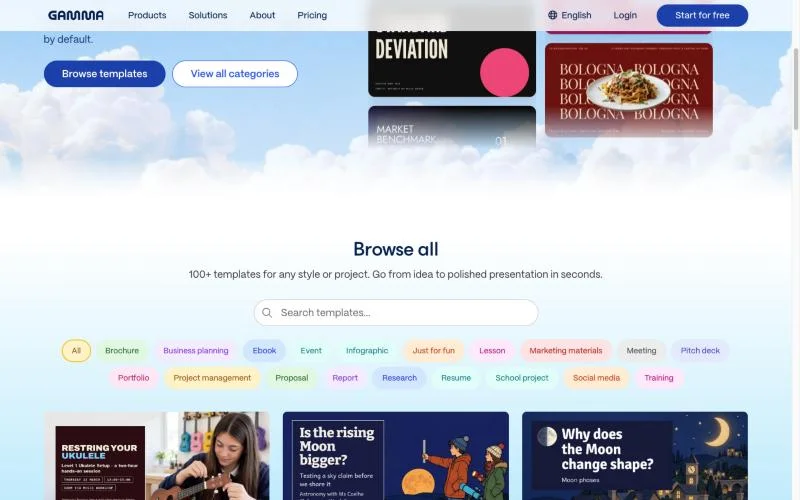
You can build your own theme in the theme editor, with your colors, fonts, and logos. Gamma's theme help article also lets you import a PowerPoint or Google Slides file, so Gamma can detect your existing styles. Logo headers and footers are available on Pro and above.
Import and Export Options
Every plan, including Free, can import PDF and PPTX files and export to PDF, PPTX, PNG, and Google Slides. That's generous. Many AI tools lock PowerPoint export behind a paid plan.
The quality of those exports is the real question. Gamma's export help article says exports reflect Present Mode, not Edit Mode, so you should expect some visual differences. We cover the specific gaps in the limits section below.
Gamma also connects to 25+ tools, including Slack, Notion, and Dropbox, so you can pull existing content into a draft instead of pasting it.
Formats Beyond Presentations
Gamma isn't only a slide tool. The same editor creates documents, social media visuals, and websites you can publish to a link. A one-pager, a white paper draft, and a carousel can all share one brand theme.
Websites are the most useful extra for small teams. You can turn a deck into a simple live page, and Pro supports up to 10 custom domains. Don't expect a full website builder, though. It suits landing pages and event pages, not a 50-page marketing site.
API and Automation
Gamma launched its Agent and a public API in September 2025, according to Gamma's pricing update announcement. The API lets developers automate deck creation and editing inside their own products.
This matters if you generate lots of similar decks, such as sales proposals or client reports. For most solo users, it's a feature you'll never touch.
Pros and Cons of Gamma AI
Gamma's strengths are speed, visual range, and a useful free plan. Its weaknesses show up when you need brand precision or native PowerPoint files.
| Pros | Cons |
|---|---|
| Outline-first generation helps you fix the story before the design | AI copy and images need editing before you present |
| Free plan includes PPTX, PDF, PNG, and Google Slides export | Free credits are one-time and don't refill |
| One editor for decks, docs, websites, and social visuals | Exports can differ from what you see in the editor |
| Custom themes with your fonts, colors, and logos | Custom branding and analytics start on Pro |
| Paid credits roll over up to 2x your monthly amount | Credit costs vary by model, so heavy use is hard to predict |
Gamma AI Pricing
Gamma has four individual plans (Free, Plus, Pro, and Ultra) and two team plans (Business and Enterprise). Paid plans include monthly AI credits, and annual billing saves up to 26% according to Gamma.
Pricing checked: November 6, 2026. Gamma shows prices in your local currency, so the table lists what each plan includes rather than amounts. Check Gamma's pricing page for what you'll pay before you upgrade.
| Plan | AI credits | Key additions |
|---|---|---|
| Free | 400 at signup, no refill | Up to 10 slides per prompt, PDF and PPTX import, all exports |
| Plus | 1,500/month | 100 slides per prompt, no Gamma branding, advanced image models |
| Pro | 4,000/month | Premium image models, custom branding, analytics, 10 custom domains |
| Ultra | 20,000/month | Most advanced text, image, and video models, 100 custom domains |
| Business | 10,000/seat/month | Shared workspace credits, SSO, advanced data controls |
| Enterprise | Custom | SCIM, admin controls, invoiced billing, dedicated support |
Credits power AI actions. Gamma's credits help article explains that unused plan credits roll over, up to double your monthly amount. Plus can hold up to 3,000. Paid users can also buy extra credits, and purchased credits don't count toward that rollover cap.
So, is Gamma AI free? Yes, but only as a trial in practice. The 400 signup credits don't refill. Free users can earn more by referring friends: 200 credits per referral, up to 2,000.
Limits to Know Before You Rely on Gamma
Gamma's limits matter most at three points: exporting, scaling usage, and matching a strict brand. Check each one before you commit a client deliverable to it.
Export Fidelity
Exports follow Present Mode, so your file won't always match the editor. Gamma's export help article lists a few known gaps:
- Google Slides ignores fonts embedded in uploaded PPTX files and swaps in its own.
- A solid page background may not appear in PDF, PPTX, or Google Slides exports. The fix is to set a card background color on each card.
- Large or numerous images can make exports fail or render incorrectly.
Credit Usage
Credits make heavy use harder to predict. Gamma says the number of credits an action uses depends on the task, the AI model, and the length or complexity of the generation. Premium image and video models burn through credits faster than basic edits.
Gamma's own pricing update announcement says more than 90% of users won't feel the change. If you generate dozens of decks a week, you're a power user. Track credits for a month before you pick a plan.
Brand Control
Gamma's themes cover colors, fonts, and logos, but custom branding is a Pro feature, and centralized brand governance sits in Business and Enterprise. If your company has a locked master template with strict layout rules, Gamma's AI layouts will feel loose. You'll spend time pulling slides back on brand.
Who Should Use Gamma?
Gamma is a strong pick when speed and visual quality matter more than pixel-level control. It's a weaker pick when your organization runs on native PowerPoint files.
Gamma is a good fit for:
- Founders who need a pitch deck, one-pager, and simple site in one place.
- Marketers who turn blog posts, reports, or briefs into shareable visual summaries.
- Educators and trainers who build lessons and workshops each week.
- Consultants who send decks as links and want view analytics (Pro and above).
Look elsewhere if:
- Your team must edit every deck in PowerPoint or Google Slides after it's created.
- You need strict compliance with a corporate master template.
- You mostly design non-presentation graphics. A general design tool fits better, and our roundup of the best free and paid graphic design software covers those options.
Gamma AI Alternatives
The best Gamma alternative depends on where your final deck lives. Choose by workflow first, then by price.
| Tool | Best for | Pricing (checked Nov 6, 2026) | Free access |
|---|---|---|---|
| Gamma | Fast AI drafts shared as links, plus docs and sites | Plus, Pro, and Ultra; price shown in local currency | Free plan, 400 one-time credits |
| Canva | Decks made alongside other branded marketing assets | Check Canva Pro pricing for your region | Free plan available |
| Beautiful.ai | Smart slide templates that adjust layouts automatically | Pro: $14.50/month, billed annually | 14-day trial, card required |
| Plus AI | Generating and editing inside Google Slides and PowerPoint | Basic: $10/user/month annually or $15 monthly | 7-day trial with 1,000 AI credits, card required |
| Microsoft Copilot in PowerPoint | Teams already standardized on Microsoft 365 | Bundled with eligible Microsoft 365 plans | Varies by plan |
A quick rule: if the deck ends as a link, start with Gamma. If it ends as an editable PowerPoint or Google Slides file, test Plus AI or Copilot first. If your deck is one asset in a bigger campaign, Canva keeps everything in one place.
Want the full field? Our AI presentation maker comparison covers 17 tools side by side.
Is Gamma AI free to use?
Yes. Gamma's Free plan gives you 400 credits at signup, up to 10 slides per prompt, and PDF, PPTX, PNG, and Google Slides export. The credits don't refill, so it works best as an extended trial.
Can Gamma export to PowerPoint?
Yes. Every plan, including Free, exports to PPTX. Exports reflect Present Mode, so some visual differences are expected. Open the file in PowerPoint before you present.
Does Gamma remove its watermark on the Free plan?
No. Removing Gamma branding starts on the Plus plan, which also adds 1,500 monthly credits and up to 100 slides per prompt.
Can I use my brand fonts and colors in Gamma?
Yes. Gamma's theme editor lets you add your own colors, fonts, and logos, or import a PowerPoint or Google Slides file to detect them. Custom branding features are listed on the Pro plan.
What AI models does Gamma use?
Gamma uses several models, including Claude, ChatGPT and DALL-E, Gemini, Flux, Recraft, Ideogram, Luma, and Leonardo. Higher plans unlock premium and advanced models, which use more credits.
Is Gamma better than Canva for presentations?
Gamma is faster for generating a full deck from a prompt. Canva is better when your presentation sits alongside social posts, ads, and other branded assets. Many marketers use both.
Great decks borrow from great design. Before you generate your next one, study how real brands structure their marketing content.
Summarize this article with AI:
 ChatGPT
 Perplexity
 Claude
 Grok

Written by
Taher BatterywalaFounder & Chief Curator
Taher Batterywala is a creative marketer who loves to write & design content that organically drives conversions. He is the creator of Pineable, the world's first content marketing design inspiration hub. He regularly shares his thoughts about content design, SEO, and marketing. As a true cinephile, he admires movies above anything else.