Most AI website builders will hand you a working site in about five minutes. The trouble starts on day two, when you notice it looks like every other AI-built site on the internet. Feature lists and pricing tables won't warn you about that. So we ranked 20 tools on what they output: layout variety, typography control, whitespace, and how much of the design you can change once the AI stops.
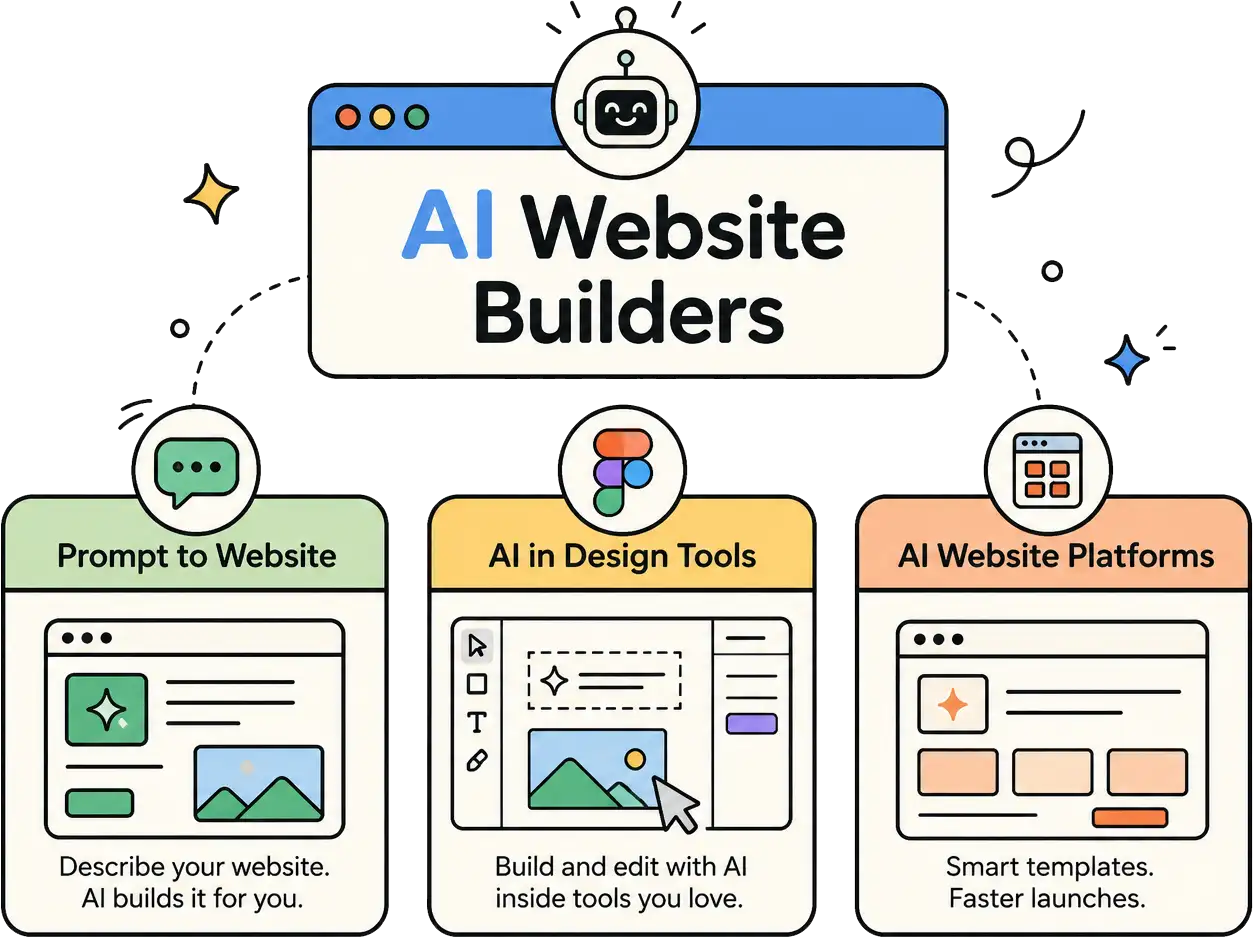
- Four different product types share the label "AI website builder." Picking the wrong class costs more than picking the wrong brand.
- Editability beats first output. A fixable mediocre page is worth more than a polished one you can't change.
- Framer and Webflow give designers the highest ceiling. Wix and Hostinger get you live fastest.
- Relume generates a sitemap, wireframes, and a style guide instead of a finished page.
- Credit-metered tools cost more the more you redesign. Flat monthly pricing suits heavy iteration better.
There's no single best AI website builder, because four different products wear that label. Pick your class first, then your tool. Prompt-to-site platforms win on speed. Design-tool AI wins on control. WordPress AI keeps your site portable. Code-generating tools handle what a site builder can't express.
If design differentiation matters to you, weight editability above the quality of the first generated page. All prices below were checked in August 2026 from a US session.
Four Different Products Are Sold as an AI Website Builder
The label covers four classes with different outputs and different ceilings. Comparing across them on price alone is how people end up with the wrong tool. Your class decides what you can change later, and that matters more than the first result.
Prompt-To-Site Platforms
You describe a business and get a hosted, multi-page site with copy and imagery. Output is assembled from a finite template and section library, so speed is the win and sameness is the cost. Best for anyone who needs a live site this week and won't art-direct it.
AI Inside a Professional Design Tool
The AI generates a starting layout, sometimes with a style guide attached, inside a tool built for manual design control. Your ceiling becomes the design tool's ceiling instead of the model's. The tradeoff is a learning curve measured in days, not minutes.
AI Layered Onto WordPress
The AI builds pages inside WordPress, so your output stays portable and plugin-compatible. You aren't locked into one company's proprietary editor. You do inherit WordPress maintenance: updates, backups, and the occasional plugin conflict.
Code-Generating Tools, Sometimes Called Vibe Coding
These write application code from a chat prompt, producing something closer to an app than a brochure site. Nothing constrains output to a template library. Editing means re-prompting or editing code, and hosting becomes your problem.
How to Judge the Design Output
Feature counts don't predict whether you'll like the site. These five criteria do. Run your shortlist through them before you commit, and weight the fourth one heaviest.
Layout Variety
Count how many structurally different pages a tool can produce. Run the same prompt twice, then run a contrasting one. If you get the same hero, three-card, testimonial, footer sequence every time, the template library is small.
Typography Control
Check whether you can set a full type scale or only swap a font family. Good tools expose heading and body pairings independently, plus line height and letter spacing. Weak ones give you a dropdown of five fonts.
Whitespace and Visual Hierarchy
Look at whether section padding is editable as a system or one element at a time. Then check the generated page for reading order. If every section carries the same visual weight, nothing guides the eye.
Editability After Generation
This is the criterion that predicts regret. Ask whether you can restructure a section or only refill it, and whether design changes apply globally through tokens or manually page by page. Check what you can export if you leave.
How Recognizable the Output Is
Judge whether the result reads as a specific brand or a generic template holding your words. The tells are consistent: identical gradient treatments, the same card grids, default sans-serif pairings, and uniform section padding across unrelated industries.
Prompt-To-Site Platforms
This is the largest and most marketed class. Every tool here trades design range for speed. The good ones are honest about it.
Wix
Wix builds a site from one prompt, with plans from free to $159.77/month and the entry paid tier at $17.77/month. It has the widest template range in this group, so it holds up across a second and third project.
Best for: Creators wanting to try out a robust design tool without getting into complexities.
Squarespace
Squarespace Blueprint AI turns your business details into a personalized site. Its typography defaults are the most restrained here, which is why Squarespace sites rarely look cheap. AI credits are metered separately, so check what your tier includes.
Best for: People looking out for a polished interface compared to other platforms.
Hostinger
Hostinger produces a first version in seconds, advertised at $2.99/month on a 48-month term against a standard rate of $11.99/month. It's the cheapest serious option, and the template library is correspondingly smaller.
Best for: Budget-first projects where design range is negotiable.
GoDaddy Airo
GoDaddy Airo generates site content alongside logos and marketing assets, built around getting a business online today. Speed-first tools score lowest on layout variety, and this one prioritizes publishing over design range.
Best for: Creators want to get live fast without spending much time to make your site heavily creative.
Shopify
Shopify will spin up a store from a prompt and names its AI assistant Sidekick. Most of what you see is theme defaults rather than generated design.
Best for: eCommerce business owners, a simple no-brainer.
Duda
Duda covers content generation, website generation, and agentic SEO, running $19 to $149/month on annual billing with AI credits metered on top. It's built for agencies shipping volume, so verify that outputs differ between clients.
Best for: Agencies managing many sites.
Durable
Durable generates a small service business site plus marketing assets, with agents handling follow-up tasks. The template range is deliberately narrow, which is the trade for its speed.
Best for: Solopreneurs who need a site and a lead form.
Jimdo
Jimdo generates structure, copy, images, and calls to action, and has a genuine free tier. Free tiers usually mean the smallest template library in a comparison, so test layout variety early.
Best for: Experimenting with new layouts without paying.
Hocoos
Hocoos uses a short guided setup, priced flat at $15/month or $150/year after a 14-day trial. Short questionnaires constrain input, and that shows up as low layout variety.
Best for: People who want to get started without complex configuration setups.
B12
B12 generates sites, apps, and stores from a described idea, then refines through chat instead of a canvas. Chat-only editing is a real constraint on specific design changes.
Best for: Professional services firms that won't open an editor.
AI Inside a Design Tool
This class trades a learning curve for a much higher ceiling. It's also where the editability criterion separates tools most sharply.
Framer
Framer meters AI as credits inside plans that run free, $10/month, and $30/month. It has the strongest typography and spacing controls in this article, which makes the AI output a draft rather than a destination.
Best for: Designers, and anyone willing to learn one tool properly.
Webflow
Webflow's AI site builder generates a site together with a scalable design system, not a flat page. If that system is genuinely editable, it's the highest ceiling available anywhere here. Expect the steepest learning curve to match.
Best for: Teams maintaining a site for years.
Relume
Relume inverts the category. Instead of a finished page it generates a brief, sitemap, wireframes, and a style guide with color, typography, and spacing tokens, then exports to Figma, Webflow, or React.
Best for: Designers who want structure and a system to build from.
AI on Top of WordPress
Almost every AI builder roundup skips this class. That's a mistake if you're already on WordPress, because the output stays portable and you keep the plugin ecosystem.
10Web
10Web produces full WordPress sites, with business tiers at $10 to $22.50/month annually. Its agents redesign existing pages, clone a page from a URL, and convert Figma files, all directly useful for fixing generic output.
Best for: Those who are looking for cleanest path from prompt to real WordPress.
Elementor
Elementor draws AI from a shared credit pool, with annual plugin tiers from $49/year for one site. The AI assists page building rather than generating a whole site, so set expectations accordingly.
Best for: DIY website enthusiasts, WordPress veterans
Divi AI
Divi AI generates layouts, text, images, and code inside Divi at $16.08/month billed yearly. It states unlimited generation with no usage cap, which changes the math if you iterate heavily.
Best for: heavy iteration on a fixed budget.
Code-Generating Tools
These produce applications, not brochure sites. Hosting and upkeep become yours. Pricing is credit-metered, so cost scales with how often you change your mind.
Lovable
Lovable is the popular pick for non-developers, metering credits per action from 0.50 for a button restyle to 1.70 for a landing page with images. Its free tier grants 5 build credits daily, capped at 30 monthly.
Best for: building what a site builder can't express.
Vercel v0
v0 generates React and Next.js components plus full-stack apps, free with $5 of monthly credits and then $30/user/month. Component-level output makes it the best fit here for building against an existing design system.
Best for: teams with a design system already in place.
Bolt.new
Bolt.new builds from chat and imports from Figma or an existing repository. That Figma path is the most direct answer to generic output in this class.
Best for: shipping fast from an existing design file.
Replit
Replit builds and deploys in one environment with a database included, starting at $20/month billed annually. It's the least design-oriented tool here, and Replit cautions that agent output is probabilistic and can be wrong.
Best for: functional prototypes where design is secondary.
Why So Many AI-Built Sites Look the Same
The convergence is structural, not a failure of any one product. Template-based builders draw from a finite library of layout patterns, and they reach for the safest one available. Ask ten tools for a consultancy homepage and you'll get the same section order: hero, three feature cards, testimonials, call to action.
That matters because visual judgments happen fast. Research by Lindgaard, Fernandes, Dudek, and Brown in Behaviour & Information Technology found people form a reliable impression of a page's visual appeal within about 50 milliseconds. A layout your visitor has seen a hundred times is working against you before they read a word.
Be fair to the tools, though. A safe default is reasonable engineering for a product that has to produce something acceptable for any business. It only becomes a problem when differentiation is the point.
Four Things to Change Once the AI Hands You a Site
Change the type, the spacing, the imagery, and the section order. Those four edits move a generated site further from the default than any amount of copy rewriting.
Typography: Replace the default pairing and set a deliberate type scale instead of accepting the generated sizes. Our font pairing tool will get you to a combination that isn't the platform default.
Whitespace: Adjust section padding so the page has breathing room and a reading rhythm. Uniform blocks are the clearest signal of an untouched template.
Imagery: Swap out generated and stock images first. This is the fastest single tell of an AI-built site, and the cheapest thing on this list to fix.
Section order: Reorder to match the argument you're actually making. The generated hero, features, testimonials, CTA sequence exists because it's safe, not because it fits your business.
For each of those, work against real published examples rather than an abstract rule. That's what our collection of real-world marketing content designs is for.
How to Choose
Choose the class first, then the tool. Need a site live this week and won't art-direct it? Take Wix or Hostinger.
Want design control and will invest a few days learning? Framer or Webflow.
Already on WordPress? 10Web.
Building something interactive that a site builder can't express? Vercel v0 or Lovable.
Skip AI builders entirely if your site is your primary differentiator and you have budget for a designer. The AI replaces production work, not the judgment about what belongs on the page.
The first output matters far less than how much of it you can change.
Can an AI website builder replace a web designer?
No, but it replaces a lot of production work. AI handles layout assembly, first-draft copy, and placeholder imagery in minutes. It doesn't decide what belongs on the page, what your brand should feel like, or why one structure converts better than another.
Will a site built with AI rank on Google?
Yes, if the content is worth ranking. Google's guidance confirms that standard SEO practices still apply for AI search features and that no special files or formatting are required. The risk isn't the tool that built the page. It's publishing generated content with no original value.
What does an AI website builder actually cost?
Most platform tools land between ten and forty dollars a month, while WordPress plugins bill annually instead. Code-generating tools price by credits, so heavy design iteration costs more than the headline rate suggests. Watch for introductory rates tied to multi-year commitments.
Can you build a website with AI for free?
Yes. Wix, Jimdo, Framer, Duda, and Lovable all offer free tiers. The constraint is rarely features. It's usually platform branding, a subdomain instead of your own domain, or a monthly credit cap that stops you mid-project.
Do AI-generated websites look generic?
Often, yes, because most builders draw layouts from a finite template library and default to the safest pattern. It's fixable. Changing the typography, spacing, imagery, and section order moves a generated site well away from its default.
Which AI website builder is best for designers?
Framer for speed and Webflow for ceiling. Both put AI inside a real design tool, so you can restructure anything the model produces. Relume is the third option if you'd rather generate a sitemap, wireframes, and a style guide, then build elsewhere.
Whichever tool you pick, the AI hands you a starting point, not a finished design. What you do in the hour after that is what makes the site yours. Our curated resource library collects the tools and templates worth using in that hour.
Summarize this article with AI:
 ChatGPT
 Perplexity
 Claude
 Grok
Grok

Written by
Taher BatterywalaFounder & Chief Curator
Taher Batterywala is a creative marketer who loves to write & design content that organically drives conversions. He is the creator of Pineable, the world's first content marketing design inspiration hub. He regularly shares his thoughts about content design, SEO, and marketing. As a true cinephile, he admires movies above anything else.